

A homeowner wants to paint the house, or run a cedar fence along the back line. They send a note to whoever they think is on the board, and somebody eventually says yes in a text message. Two years later, nobody can say who approved it, or why.
In HOA-OS, the request arrives on a form, the committee decides it in one place, and the reason goes onto the request itself, where the next board can read it.
What the video covers
- The board setting what its architectural review form asks
- The homeowner sending the request from the community site
- The ARC Reviews board, where requests wait by status
- The whole request on one screen, and the committee that decides it
- Approve, Deny or Request More Info, and when a reason is required
- Decisions the community already made
- What the homeowner sees
- What it does not do
The full walkthrough, in words
The form belongs to the board, and so does what it asks. In the video, the board opens its architectural review form under Forms and adds a line of guidance to the Project Description field: "Include the materials, the colors, and where on the lot the work will go." Then it saves the form.
Then the homeowner opens the same architectural review form on their own community site, and the board's line sits right under Project Description, above the box they type into. The form asks where the work is happening and what the project is, then leaves room for the homeowner to describe it in their own words, along with who's doing the work and what they expect it to cost. They send it.
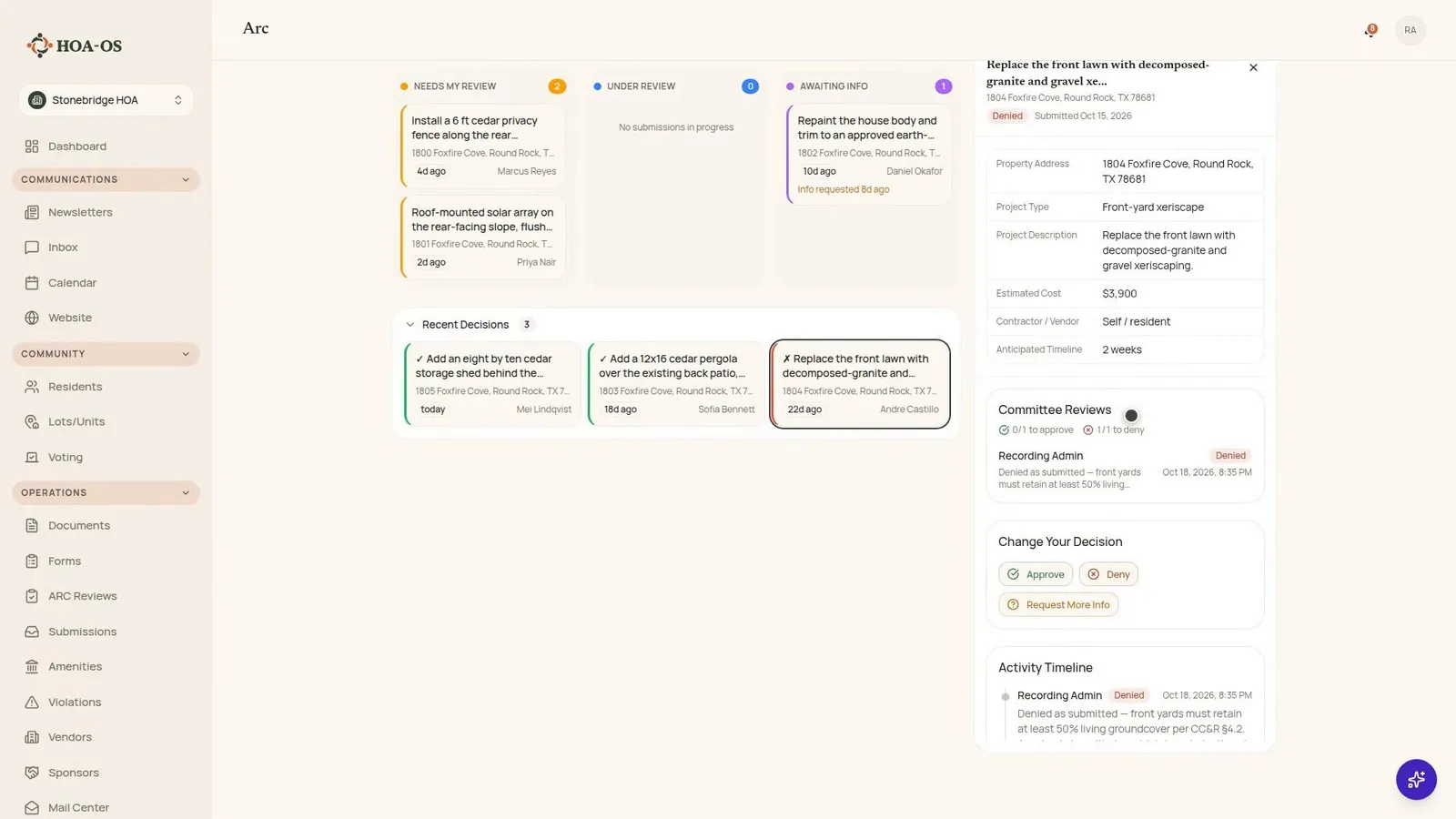
On the board's side, it's already arrived. ARC Reviews holds everything the community currently owes somebody an answer on, grouped by where each request stands. The Needs My Review column on the left holds the requests waiting on this reviewer right now.
Opening one brings up the whole request: the homeowner, the property, the project the way they described it, the cost and the contractor.
The Committee Reviews section shows who's allowed to weigh in on a request and how many of them have to agree before it's settled. The demo community has it set to one reviewer.
The reviewer can choose Approve, Deny or Request More Info, and under them is a box for what the reviewer writes. A denial won't go through without a reason, and Request More Info needs a note saying what's needed. For an approval the comment is optional, and the reviewer in the video writes one anyway. Once it's decided, the request carries the reason, and the activity timeline underneath says who decided it and when.
Decided requests sit in the Recent Decisions row under the columns, which stays closed until someone clicks it. The video opens one that was denied weeks earlier, and the reason is still on it, citing the section of the covenants it relied on.
Back on the homeowner's side, the bell on their portal dashboard shows the decision and the committee's reason, the same sentence the reviewer typed, and My Submissions lists the request as Approved.
Filmed in the product on a demo community. The homeowners, addresses and projects were made up for the video.
What it does not do
It doesn't stop the work. If somebody builds anyway, that's a violation.
Questions boards ask about this
Can the board change what the architectural review form asks?
Yes. The form belongs to the board. In the video the board adds a line of guidance to the Project Description field asking for materials, colors and placement, and the homeowner sees that line above the box they type into.
Where does the homeowner see the board's decision?
In their portal. The bell on their dashboard shows the decision and the committee's reason, and My Submissions lists the request with its status.
Does the board have to give a reason?
For a denial, yes: it won't go through without one. Request More Info needs a note saying what's needed, and for an approval the comment is optional. Whatever the reviewer writes stays on the request with the name of whoever decided it and the date.
How many board members have to agree?
The request's Committee Reviews section shows who can weigh in and how many of them have to agree. The demo community in the video uses one reviewer.
Can HOA-OS stop a homeowner who builds without approval?
No. It logs the decision. Building anyway is a violation.
Related reading
- The HOA Architectural Review Playbook
- Denying an ARC Request and Handling Work Done Without Approval
- Violation notice templates that keep your HOA consistent
See what HOA-OS covers for self-managed HOA boards at hoa-os.com/self-managed-hoa-software.