

Resident messages come in at all hours, and they wait until someone on the board opens the inbox. The trash-day question sits in the same pile as the one that can't wait.
In HOA-OS, the AI can draft the answer to a routine question from the community's own documents and hold it in the board inbox. With AI Auto-Response on, nothing the AI drafts reaches a resident until a board member reads the draft and approves it.
What the video covers
- The AI Auto-Response setting in the messaging settings
- A trash-day question and a flooding report from the same resident
- The AI draft waiting in the board inbox
- What the draft says, and the welcome guide it matches
- What happens to a draft nobody acts on
- Editing a line and approving the reply
- The flooding report, waiting for a person to answer
The full walkthrough, in words
AI Auto-Response is one switch in the messaging settings. The note under it says the AI prepares a draft, and nothing is sent to a resident until a board member approves it.
A resident who just moved in asks the board what day trash is picked up and when the bins should go out. A few minutes later, the same resident reports water flooding the sidewalk at the front entrance.
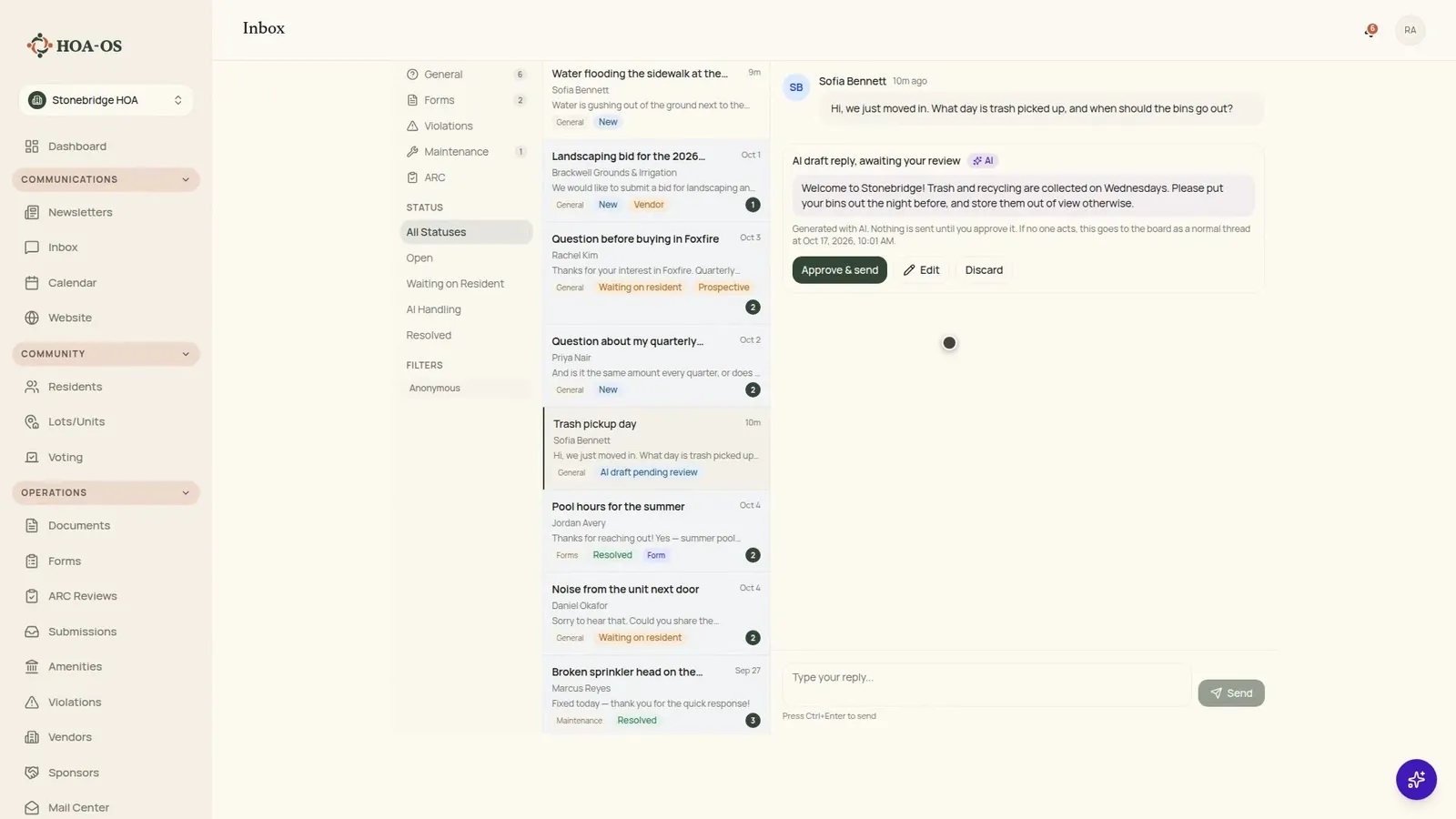
In the board inbox, both messages are waiting. The trash-day question shows an AI draft reply, awaiting the board's review. The draft matches the community's new resident welcome guide: trash and recycling on Wednesdays, bins out the night before, stored out of view otherwise.
The line under the draft gives a date and time. If no one acts by then, the message goes to the board as a normal thread.
The board can change anything before the reply goes. Here a board member tidies one line, then presses Approve & send, and the product asks once more before it sends.
The reply now sits in the thread as a board message, under the name of the board member who approved it, and the thread moves to Waiting on resident.
The flooding report waits in the inbox, marked New, for a person on the board to answer.
Filmed in the product on a demo community with sample residents.
Questions boards ask about this
Does AI Auto-Response send replies to residents on its own?
No. The AI prepares a draft, and nothing is sent to a resident until a board member approves it.
Can the board change a draft before it goes?
Yes. In the video, a board member edits one line, then approves the reply, and the product asks once more before it sends.
Where does the draft's answer come from?
The community's own documents. In the video, the draft matches the new resident welcome guide.
What happens to a draft nobody acts on?
The line under the draft gives a date and time. If no one acts by then, the message goes to the board as a normal thread.
What happened to the flooding report?
It waited in the board inbox, marked New, for a person on the board to answer.
How does the approved reply show in the thread?
As a board message, under the name of the board member who approved it. The thread then reads Waiting on resident.
Related reading
- How does a board handle resident messages without them landing in one person's personal inbox?
- How does a board share community documents with residents and keep some for the board only?
See what HOA-OS covers for self-managed HOA boards at hoa-os.com/self-managed-hoa-software.