

Governing documents usually live in one board member's email, and in a shared-drive link that's been forwarded who knows where.
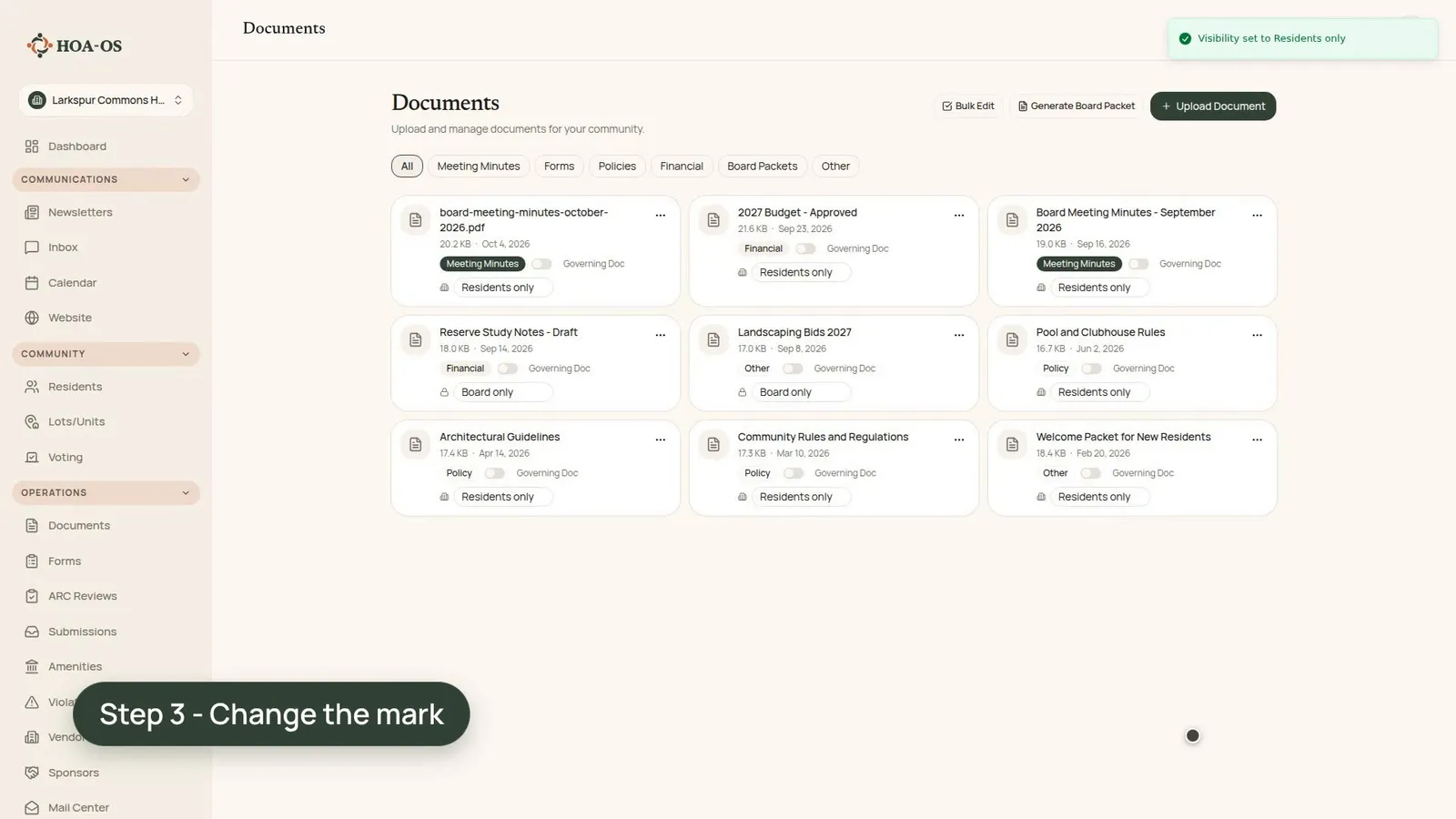
Here the board keeps its documents in one library, sorted by category, and marks each file for residents or for the board. A resident signed in to the same library sees the files marked for residents, and the board's working papers aren't on the list.
What the video covers
- The library, with each file under its own category
- Uploading new minutes and marking them for residents
- Working papers marked board only
- Changing the approved budget from board only to residents only
- The same library, signed in as a resident
- Opening the budget the board just shared
- Why a mark needs a second look when a draft becomes final
The full walkthrough, in words
The library holds the community's documents, each under its own category: rules and policies, minutes, financials.
New minutes go in the same way. The board picks the file and the category, then marks who it's for. Minutes are for residents, so the October minutes are marked residents only.
The board's working papers, like the draft reserve study notes, are marked board only. The 2027 landscaping bids are board only too.
The 2027 budget stayed board only while the board worked on it. Now that it's approved, the board changes its mark to residents only, and a notice confirms the change.
Then the same library, signed in as a resident. The new minutes and the budget are on the list. The reserve study notes and the landscaping bids aren't on it at all.
The resident opens the budget the board just shared, and it's the same file the board approved.
A resident sees a file when its mark says so, and a mark doesn't change on its own. When a draft becomes final, give its mark a second look.
Filmed in the product on a demo community. Every document in it is fictional and was written for this video, and the budget's figures are made up.
Questions boards ask about this
Can residents see the board's drafts?
Not when they're marked board only. The draft reserve study notes and the landscaping bids don't appear on the resident's list at all.
Does a document's mark change once the board approves it?
No. A mark doesn't change on its own. The budget on screen stays board only until the board changes it to residents only after approval.
How are the documents organized?
By category, such as rules and policies, minutes and financials. Each file sits under its own category.
What does a resident get when they open a shared file?
The same file the board shared. In the video, the resident opens the 2027 budget right after the board shares it.
Related reading
- HOA document retention: what to keep and for how long
- HOA records requests: what your board must provide
- The HOA secretary: records, minutes, and legal cover
See what HOA-OS covers for self-managed HOA boards at hoa-os.com/self-managed-hoa-software.