

After invoices go out, the first call a board gets is often an owner asking what this is, and how to pay it.
In HOA-OS the board can preview what an owner would get, the email and the paper letter, before anything is sent. A board that has seen both, and the page the letter points to, can answer that call.
What the video covers
- Preview on a draft run, with a tab for the email and a tab for the paper letter
- The top of the email: the community, the invoice number and dates, the owner and the lot
- The account summary and the total due
- How to pay, in the email
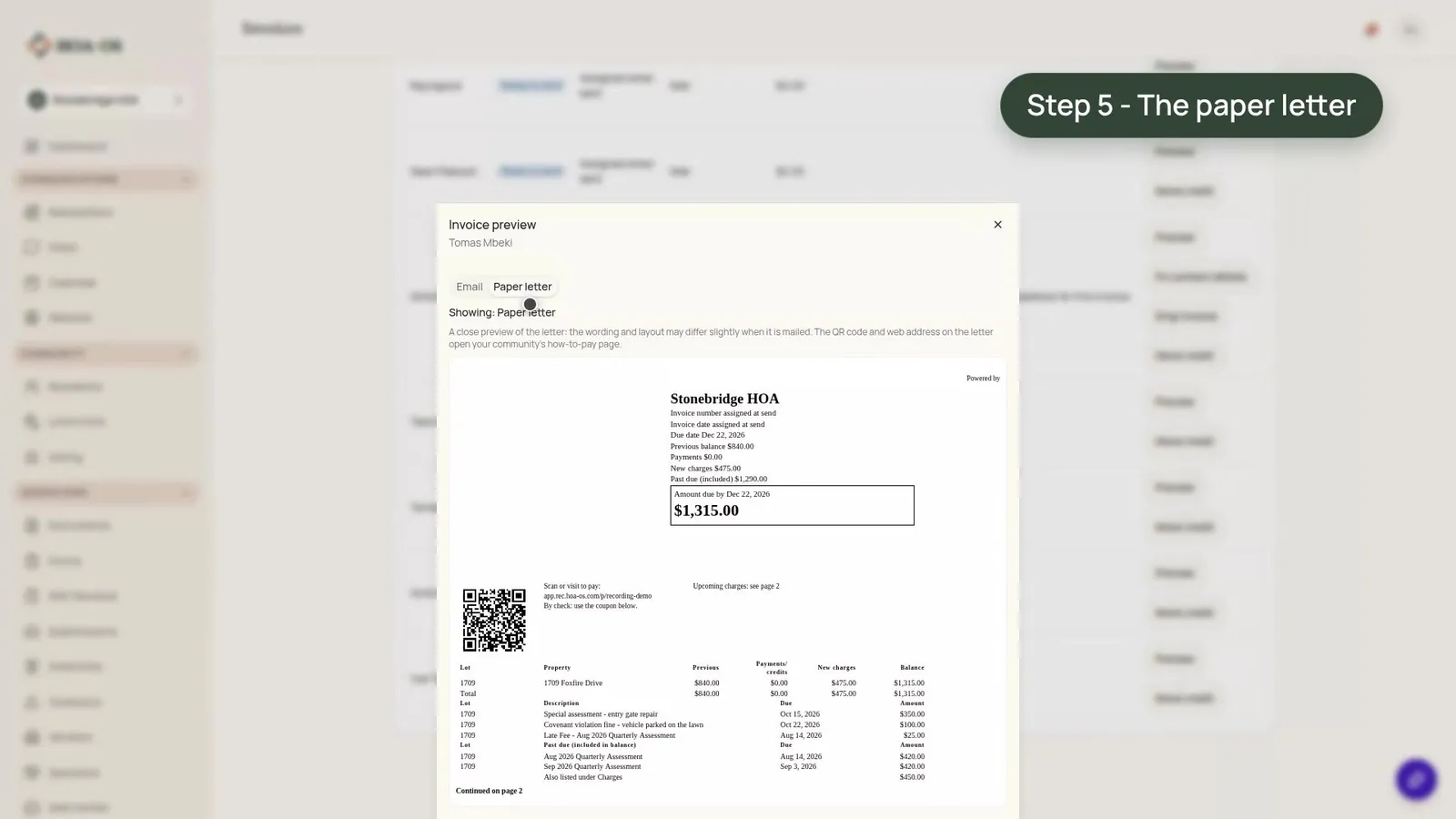
- The paper letter and its boxed amount due
- The QR code, the short web address, and the tear-off coupon
- The community's how-to-pay page
The full walkthrough, in words
The run in the video is still a draft. One owner in it has both an email and a mailing address, and his row in the run reads Email and mail. Preview opens his invoice with a tab for each, Email and Paper letter, starting on the email.
The email opens with the community's name and address, then the invoice number and dates. Nothing has been sent, so the number reads Assigned at send, and the invoice date reads Draft. Below that are the owner, his lot, and the new charges, each with what it is, when it's due and the amount.
Under Your account is the summary: previous balance, payments received, new charges and the balance due. Past due is part of that balance and is listed line by line, so an owner can see what's overdue. Then comes the total due. The next quarterly assessment is shown under it, with a note that it isn't part of the amount due.
The How to pay section gives two ways. Online, through My Payments, after signing in. Or by check, with the invoice number on the memo and the address to mail it to. In a draft's preview the email shows the words Sign in to pay in place of a button.
The Paper letter tab shows the same invoice laid out for paper. The top carries the same account summary, and the amount due sits in a box with its due date. Further down, every line is listed by lot: the balance, the charges and what's past due.
Beside the QR code the letter says Scan or visit to pay, with a short web address under it. The note above the preview says both open the community's how-to-pay page. The next line points to the coupon below for paying by check. Below the dashed line is a coupon to tear off and return with a check. It carries the invoice number, due date and amount due, the owner, who the check is payable to, and where to mail it.
This tab is a close preview of the letter. The note above it says the wording and layout may differ slightly on the real letter.
The how-to-pay page is the one the letter's QR code and web address point to, shown in the video at phone width. It offers three ways forward and shows no owner or invoice details. An owner with an account signs in to see the invoice and pay online. An owner without an account can create one, the board approves it, and then the owner can pay online. Or the owner can mail a check, and the page says who it's payable to, where to mail it, and to include the invoice number.
Filmed in the product on a demo community. The owners, addresses and amounts were made up for the video.
Questions boards ask about this
Can the board see an owner's invoice before it's sent?
Yes. Preview on a draft run opens the owner's invoice. For an owner who gets both, there's a tab for the email and a tab for the paper letter.
Why does the invoice number read Assigned at send?
Because nothing has been sent yet. In a draft's preview the number reads Assigned at send and the invoice date reads Draft.
Is there a QR code in the email?
No. The QR code is on the paper letter, beside a short web address. Both open the community's how-to-pay page.
How does an owner pay from the letter?
The QR code and web address on the letter open the community's how-to-pay page, which offers three ways. An owner with an account signs in and pays online. An owner without an account yet creates one, the board approves it, and then they can pay online. Or the owner mails a check with the coupon from the bottom of the letter.
Does the how-to-pay page show the owner's balance?
No. The owner signs in to see the invoice.
Is the paper preview exactly what gets mailed?
It's a close preview. The note above it says the wording and layout may differ slightly on the real letter.
Related reading
- How to Pay HOA Dues Online: A Guide for Residents and Boards
- How to Record a Paper Check Payment in HOA-OS
- How HOA Dues Work: A Plain-English Guide for Boards and Owners
See what HOA-OS covers for self-managed HOA boards at hoa-os.com/self-managed-hoa-software.