

Paper checks have not gone away. A few still show up every month, and someone has to type each one into the ledger by hand. That typing is where the mistakes come from, and a mistyped payment is a resident chased for money they already sent.
In HOA-OS you photograph the check instead, and the entry comes back filled in. You still read every field against the paper before you save it, and most of this video is that part.
Where this picks up
This is the payments page, where the last video finished. The ledger is running and the charges are on it. What's new is the envelope on the desk: lot 1803 is two quarters behind, $420.00 from April and $420.00 from June, both still open, and a check arrived this morning for $840.00.
Recording the check
Recording it starts where it always did, on Record Payment. What's different is the first thing the form asks for: a picture of the check. On a phone that opens the camera. At a desk it's whatever you already scanned.
The picture goes to a model that reads the fields off the face of the check, told to read only what's actually there and to guess at nothing it can't see. One thing it's told never to send back is the routing number and the account number along the bottom; those stay on the paper. What comes back is the payer, the amount, the check number, the date, and the memo.
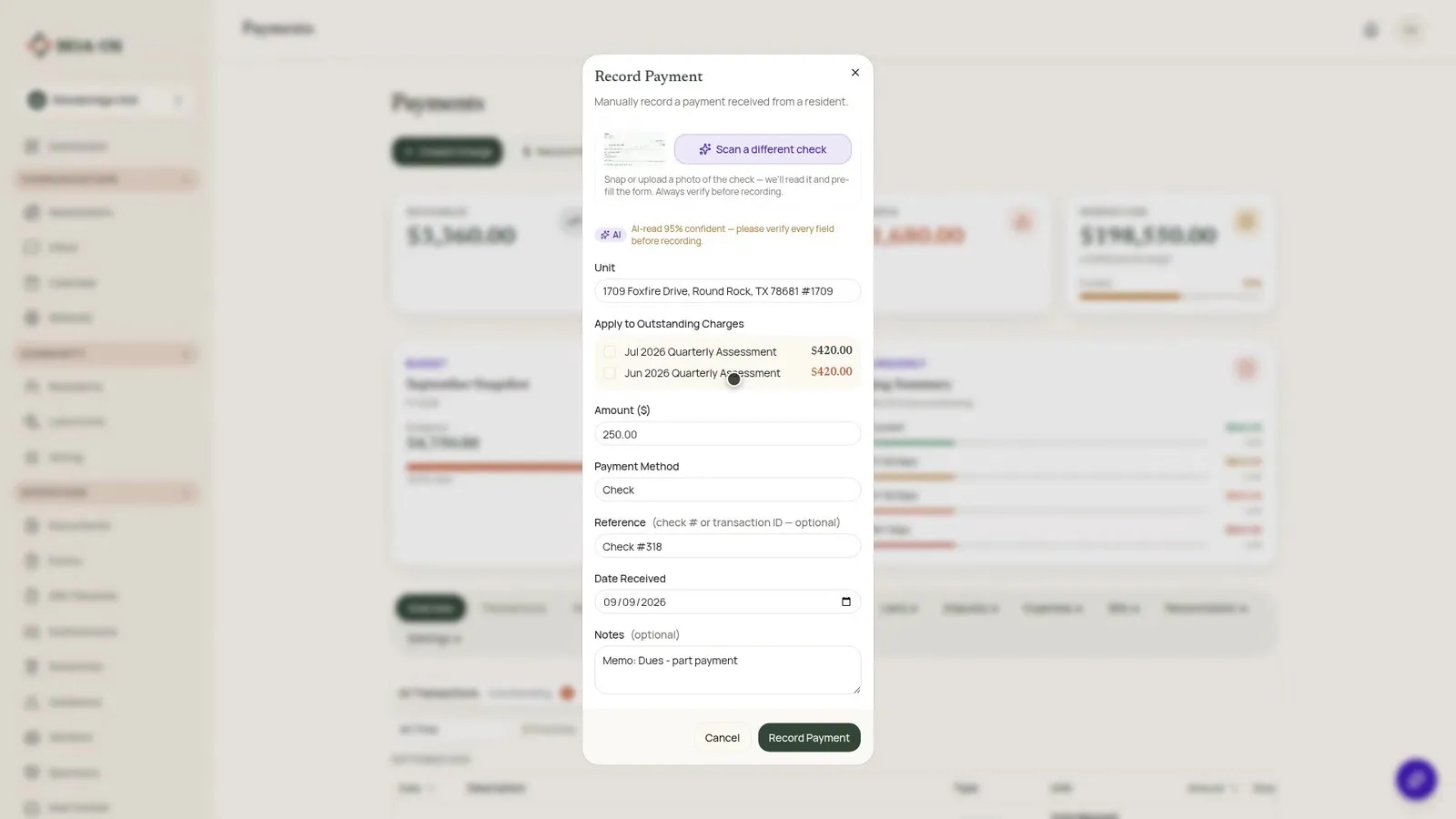
And there it is, filled in: the lot, the amount, the method set to check, the reference carrying the check number, and the memo copied into the notes. It also puts a figure on how sure it is, and asks you to check every field before recording. That line is not decoration. Read the amount against the box on the paper, the name against the name, and the date.
Underneath, the two charges this money pays are already ticked. Neither one is $840.00 on its own; together they are exactly that, which is why both are marked. Record it, and the payment lands on the ledger against that lot, and those two quarters are closed.
The second check: a board decision, not a guess
Now the second check out of the same envelope, and this is the more useful one. It reads this one the same way: $250.00, from Tomas Mbeki, and it puts the payment on his lot because the name on the paper is on the roster.
But look at the charges underneath. Not one is ticked. $250.00 is not what he owes for one quarter, and not what he owes for both. So HOA-OS has not picked one for you, and it will not. What this money pays is up to the board.
Where the photo goes after
The picture is not thrown away once it's been read. It's filed against the entry it produced, and it opens again from the receipt months later, when somebody asks what that payment was. It sits on the board's side of that receipt only; it is not something a resident can pull up from their own account.
What this does not do
Nothing in this video moves any money. HOA-OS read a piece of paper and wrote a line in your own ledger. It did not reach your bank, it did not reach the resident's bank, and the check is still on the desk where you photographed it. That paper goes to the bank the way it always has.
And it will not always read one cleanly. Tight handwriting, a fold across the amount box, a photograph at an angle, and it comes back with a field empty or less sure of itself. When that happens it says so, and hands you the form you would have been typing into anyway.
So the bookkeeping itself is not what changes. Same ledger, same entry, and a person still signs off on every field before any of it is saved. What changes is where the numbers come from. They come off the paper instead of somebody's typing at the end of a long day, and the picture stays attached to the line it became.
Chapters
- 0:00 Why paper checks still cause mistakes
- 0:35 Picking up where the last video left off
- 1:00 Photographing the check
- 1:17 What the model reads, and what it will not
- 1:44 Reviewing the filled-in form
- 2:10 Matching two charges to one check
- 2:29 The second check: a board decision, not a guess
- 3:04 Where the photo goes after
- 3:25 What this does not do
- 4:10 What changed, and what did not
FAQ
Does photographing a check move any money? No. HOA-OS reads the check and writes a line in your ledger. It does not touch your bank or the resident's bank; the physical check still goes to the bank the way it always did.
What does HOA-OS read off the check, and what does it deliberately skip? It reads the payer, the amount, the check number, the date, and the memo. It is told never to read back the routing number or account number along the bottom; those stay on the paper.
What happens if the check doesn't match a charge exactly? HOA-OS only ticks a charge, or a combination of charges, when the amount matches exactly. If it doesn't, nothing is pre-selected, and which charge the payment applies to is left to the board.
Who can see the stored check image? It's filed against the payment entry on the board's side only. A resident cannot pull it up from their own account.