

The first invoices a board sends its owners settle two things that are hard to take back. The numbering starts somewhere, and from then on it only moves forward. And a line gets drawn between the charges an owner sees one by one and the older ones that arrive as a single balance.
In HOA-OS the board settles both, along with a few other choices, on one settings page before its first invoice run is created. One of those settings, the invoice window start, is the date that decides where that line falls.
What the video covers
- Where Owner invoices sits in the menu
- The card for creating a run, which waits until the invoice window start is set
- Delivery: paper and email, or email only
- Send mode, and why each run waits as a draft
- Days until due
- The invoice number prefix and the next invoice number
- The invoice window start, and what it does to a lot's first invoice
- Saving the settings and going back to Owner invoices
The full walkthrough, in words
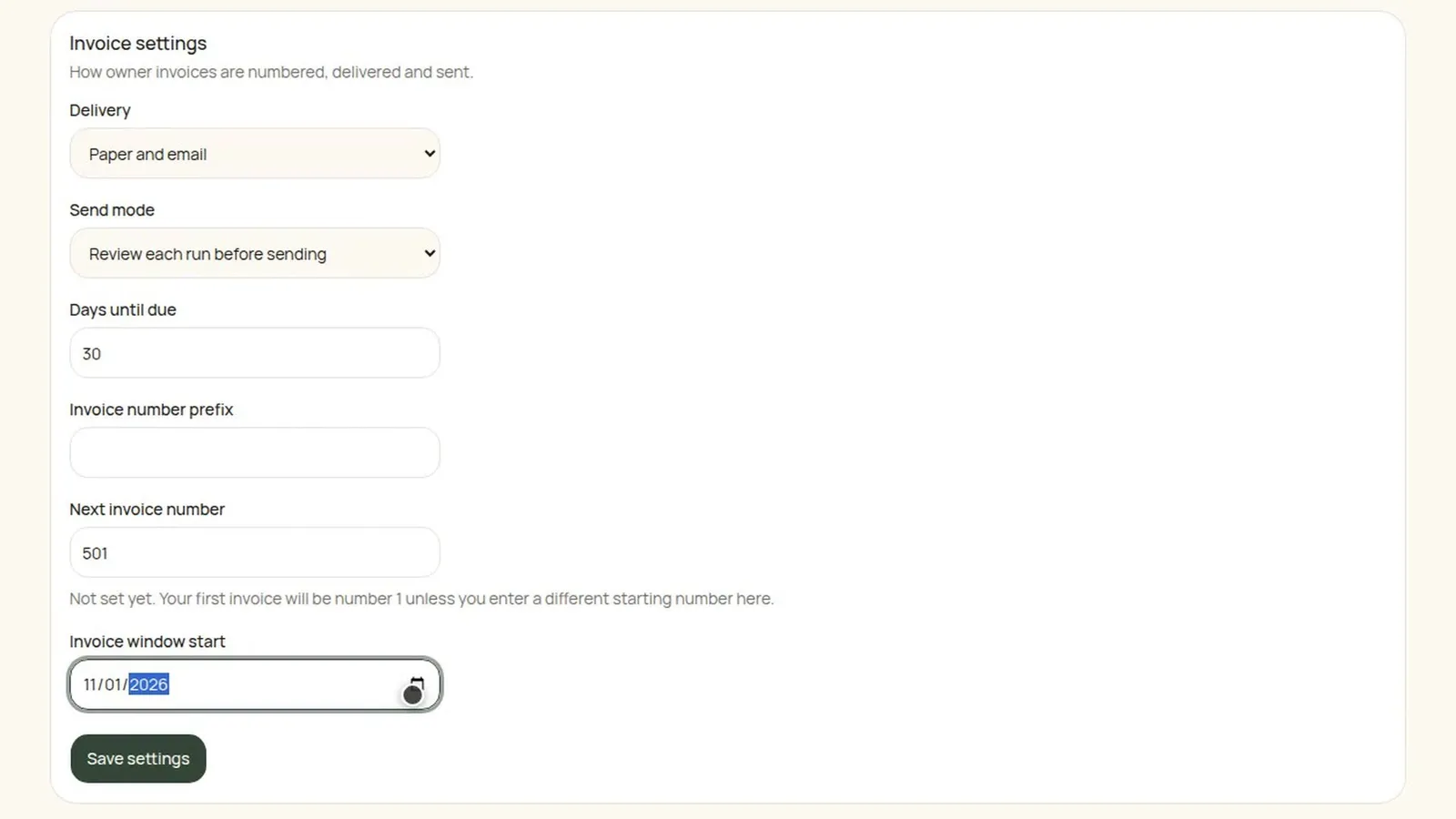
Owner invoices sits in the menu under Finance, just below Payments. The card for creating a run has no date and no button yet. It says the invoice window start has to be set first, so the board opens Invoice settings at the top of the page.
Delivery has two choices: paper and email, or email only. For an owner with both an email and a mailing address, paper and email sends both, and email only sends just the email. An owner with only an email gets an email either way. An owner with only a mailing address still gets a letter in the mail, even on email only. When an owner has neither, the invoice is held, with a note that there's no usable email or mailing address. The community in the video stays on paper and email.
Send mode is left as it is: review each run before sending. Each run is created as a draft, and nothing goes out until someone on the board sends it. The other choice, send automatically, stays unselected.
Days until due is thirty. The box takes a whole number from 1 to 365, and the days count from the run's as-of date, or from today if that date has already passed.
This community has never saved a prefix, so its invoice numbers print as INV- followed by six digits. A prefix the board saves can't end in a number.
Next invoice number starts empty, and the note under it says the first invoice will be number one unless the board enters a different starting number. The board in the video types 501, so the first invoice the community sends gets that number. A board leaving an old system might start above its last number there. Once it's saved, the next invoice number can only go up, and it can't be cleared.
The invoice window start is the other setting that's hard to take back. In the video it's the first of November. On a lot's first invoice, charges entered on or after that date print line by line, and everything entered before it rolls into one line called Previous balance. The date can still be changed later. But once a lot has had an invoice sent, its later invoices pick up from that one, and changing the date won't move where the line falls for that lot. It's worth settling before the first run.
The board saves the settings and goes back to Owner invoices. From here, each run it creates waits as a draft until someone on the board sends it.
Filmed in the product on a demo community. The community and its figures were made up for the video.
Questions boards ask about this
Can the next invoice number go back down after it's saved?
No. Once it's saved, it can only go up, and it can't be cleared. A board leaving an old system might set its starting number above its last number there before saving.
What happens to charges from before the invoice window start?
On a lot's first invoice, everything entered before that date rolls into one line called Previous balance. Charges entered on or after it print line by line.
Does an owner with only a mailing address get anything on email only?
Yes. They still get a letter in the mail.
What if an owner has no email and no mailing address?
That owner's invoice is held, with a note that there's no usable email or mailing address.
Does each run wait for the board before it goes out?
With send mode on review, yes. Each run waits as a draft until someone on the board sends it.
How many days can the board give owners to pay?
A whole number from 1 to 365, counted from the run's as-of date, or from today if that date has passed.
Related reading
- How HOA Dues Work: A Plain-English Guide for Boards and Owners
- How to Collect HOA Dues Without the Awkward Conversations
- How a board collects dues online and tracks who hasn't paid
See what HOA-OS covers for self-managed HOA boards at hoa-os.com/self-managed-hoa-software.