
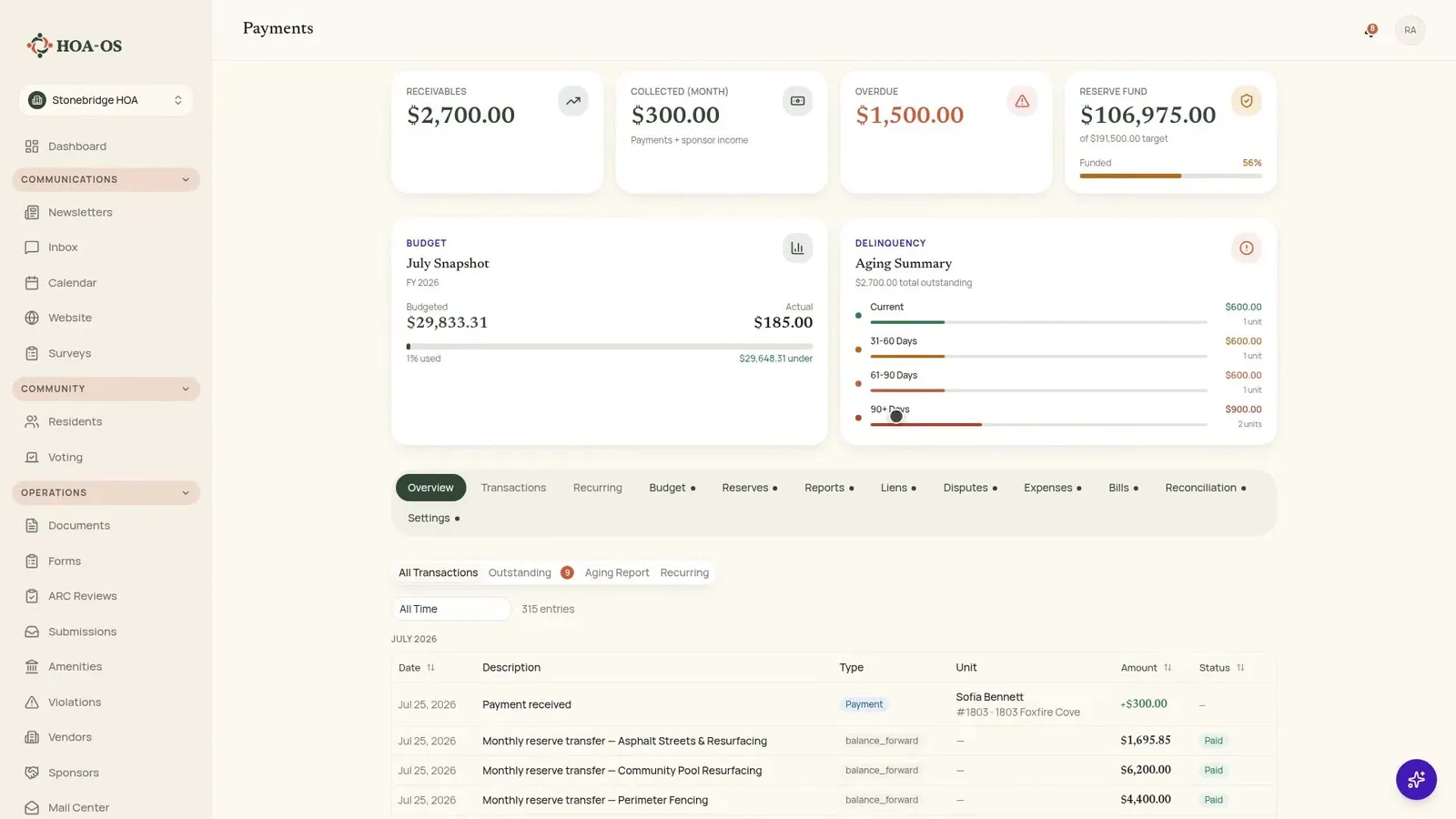
Every quarter it is the same job. Check the bank statement, update the spreadsheet, work out who has paid, and rewrite the same reminder emails you wrote last quarter. The walkthrough below shows what that job looks like once the schedule is set: residents pay online, the ledger tracks who is behind, and the part you used to do by hand mostly stops existing.

Set the dues schedule once
The example is a community billing every unit three hundred dollars a quarter. Rather than typing charges in unit by unit, you create one schedule for it.
Name it, set the amount, pick quarterly, and give it a next due date. It applies to every unit in the community. Save, and it is active.
That is the whole setup. From there the charges generate themselves each cycle: when a quarter comes due, every unit gets its charge automatically, same amount, same date, no data entry. Each unit's account shows its charges with due dates and status, so there is one place to look instead of a spreadsheet tab per year.
One-off charges live in the same place
Not everything runs on a schedule. Sometimes there is a special assessment, or a one-off fee against a single unit.
It is the same screen: create the charge, pick one unit or the whole community, set the amount and the due date. It lands on the resident's balance like any other charge, so there is no side spreadsheet to reconcile back into the real numbers later. Then it is there, one charge on every unit's account.
What the owner actually sees
The resident side is the half boards rarely see. An owner logs in and gets their balance, what is overdue, and a way to pay it.
They can pay by card or straight from a bank account. The processing fee is shown before they commit, not discovered afterward, which is the detail that generates the phone call when a system gets it the other way around.
Payment runs through Stripe, the same checkout residents have used on plenty of other sites. They enter their card, confirm, and the payment is on its way. No envelope, no drop box, no wondering whether the check arrived. The balance clears as soon as the payment settles, and the receipt sits in their history where they can find it again.
Autopay for the residents who want it
Residents who would rather never think about dues again can set up autopay with a card or a bank account, saved once. From then on, each quarter's assessment pays itself the day it is due.
Every owner on autopay is one fewer reminder to send and one fewer balance to chase.
One ledger, whatever way the money arrived
On the board's side, that payment is already on the unit's ledger. Nobody keyed it in.
Card payments, bank transfers, and the checks you record by hand all land in the same place. That is what keeps the running balance the real one rather than a number that is right until somebody remembers to update it.
Who is behind, and by how much
This is the view boards actually run on: every unit, current or behind, and by how much.
The units that are behind are not a guess in a spreadsheet. They are on the screen with amounts and how long they have been outstanding. Thirty, sixty and ninety day aging buckets update themselves as payments come in, so the picture is current without anybody rebuilding it.
Reminders you set once
Reminders are set once, and any unit that falls behind gets the same message on the same schedule. Nobody is drafting emails.
You choose the cadence one time: a gentle note at seven days, a firmer one at thirty. After that, consistency is automatic, which is worth as much as the time saved. Every owner behind by the same amount gets treated the same way, and nobody can point at a neighbor who was let off.
Recording the checks that still arrive
Some owners will keep writing checks, and that is fine.
When one comes in, you enter it against the unit, enter the amount, then the check number, and you are done. It lands on the same ledger and the same tracking as everything else. Checks are recorded alongside automated payments rather than in a parallel system that has to be reconciled later.
Frequently asked questions
Do I have to bill each unit separately? No. One schedule applies to every unit in the community, and the charges generate themselves each cycle.
Can I bill something that is not on the schedule? Yes. Create a one-off charge against a single unit or the whole community, with its own amount and due date. It lands on the balance like any other charge.
How do residents pay? By card or straight from a bank account, through Stripe. The processing fee is shown before they commit.
Can residents pay automatically every quarter? Yes. A resident can set up autopay with a saved card or bank account, and each quarter's assessment pays itself on its due date.
What about owners who still write checks? You record the check against the unit with the amount and the check number. It goes on the same ledger as the online payments.
How do I know who is behind? One view shows every unit, current or behind, with the amount outstanding and 30, 60 and 90 day aging that updates as payments come in.
Do I have to write the reminder emails? No. You set the cadence once, for example a gentle note at seven days and a firmer one at thirty, and any unit that falls behind gets the same message on the same schedule.
The quarterly job, mostly gone
That is dues collection: the schedule bills every unit, payments post themselves, and you already know who needs a nudge before anybody asks.
If you want the background on why boards automate this part first, automating HOA dues collection before it burns out your treasurer covers the case for it. If you are ready to see it running on your own community, take a look at HOA-OS.