

A board sets the dues once a year, then spends the rest of the year keeping up with them. Somebody works out what each unit owes this quarter and types it in, and three months later somebody does it again.
In HOA-OS the board writes that schedule down once and the charges arrive on their own. Autopay is the other half, and it belongs to the resident.
What the video covers
- Writing a quarterly assessment as a recurring schedule
- Why the description and the charge type matter
- The amount, how often it runs, and the day it lands on
- A separate rate for each additional lot
- Switching the schedule off, and what that leaves owing
- Why autopay isn't on the board's side
- A resident saving a card through Stripe
- The resident's billing day and monthly ceiling
- The month the bill comes out over the ceiling
The full walkthrough, in words
The recurring schedule lives on its own tab of the Payments page. There's nothing on it yet, so the board writes the quarterly assessment this community charges.
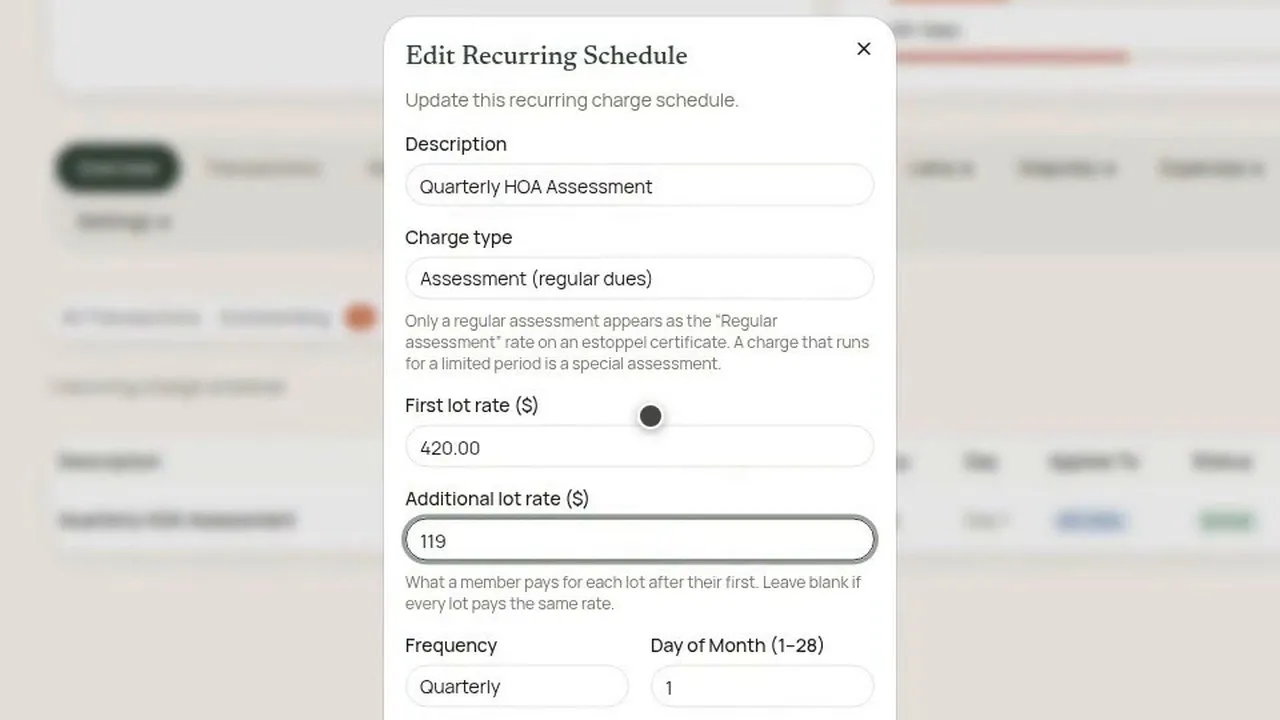
It gets a description, because that's the wording a resident sees on their own statement. It also gets a charge type. A regular assessment and a special one aren't the same thing when somebody sells and the association has to certify the dues.
Then the amount, how often it runs, and which day it lands on. The day goes up to the twenty-eighth, so it means the same thing in February as it does in July. A first due date sets where the schedule starts counting. Once it's saved, it's running: every unit gets that charge on that date without anybody entering it.
Not every association charges each lot the same. If the association's governing documents say a member pays one rate for their first lot and less for each one after that, the schedule carries both numbers. The amount already entered becomes the first lot rate, and the additional lot rate is what each lot after the first costs. Left empty, every lot pays the same.
Back on the list, the schedule says what it's going to do: the amount, how often, which day, that it applies to every unit, and the next date it runs. The board can switch it off and back on again. What it has already generated doesn't move. Turning the schedule off doesn't forgive what anybody already owes.
That's the board's half. The thing most boards go looking for next isn't on the Payments page. There's no switch there, or anywhere on the board's side, that turns autopay on for somebody. It's a card belonging to a person who isn't on the board, so it sits in their account, and they're the only one who can start it.
From a resident's account, the same community shows their balance, and next to it, autopay, switched off. The first thing it asks for is a payment method, and it says nothing is being charged now. That runs through Stripe, the same checkout the resident would use to pay a single bill. The card number goes to Stripe and stops there. It never reaches the association's software, and nobody on the board sees it.
Then the resident picks which day of the month it runs, with the same twenty-eight-day limit. They can also put a ceiling on it, the most it will ever put toward the dues in a month. Once it's turned on, it says what it's going to do: that card, that day, every month, until they say otherwise.
The ceiling matters most in the month the bill is bigger than usual. When a special assessment lands on top of the ordinary dues and the total comes out over the ceiling, autopay won't put more than the ceiling toward it. Whatever it leaves stays on the resident's balance, and on the board's ledger, still owing.
So the two halves meet at the ledger. The board writes the schedule once and the charges keep arriving on it. Residents who want autopay leave the paying to it, inside any ceiling they set, and everyone else pays the same bill themselves.
Filmed in the product on a demo community. The resident, the balance and the dues figures are made up, and the card is Stripe's test card. Nothing was charged on camera.
Questions boards ask about this
Can the board turn on autopay for a resident?
No. There's no switch for it on the board's side. Autopay sits in the resident's own account, and the resident is the only one who can start it.
Does saving a card charge it?
No. The step says nothing is being charged now. It saves the card through Stripe for later.
Does the board see the card number?
No. The card number goes to Stripe and stops there. It never reaches the association's software, and nobody on the board sees it.
What happens when the bill is bigger than the resident's ceiling?
Autopay won't put more than the ceiling toward it. Whatever it leaves stays on the resident's balance and on the board's ledger, still owing.
Does switching the schedule off forgive what's owed?
No. What the schedule has already generated doesn't move, and anything already owed stays owed.
Can lots be charged different rates?
Yes. The schedule can carry a first lot rate and a separate rate for each additional lot. Left empty, every lot pays the same.
Why does the billing day stop at the twenty-eighth?
So it means the same thing in February as it does in July.
Related reading
- How a board collects dues online and tracks who hasn't paid
- How to create and bill an HOA special assessment
See what HOA-OS covers for self-managed HOA boards at hoa-os.com/self-managed-hoa-software.