

Next year's budget usually starts in the fall, with this year's spreadsheet open beside last year's statements. On a lot of self-managed boards, the treasurer copies each line forward and guesses at the rest, and a bill paid once a year can end up budgeted as if it came every month.
Here the board asks HOA-OS for a draft of next year's budget, built from the numbers already in its books. Every line comes back with a reason. The board changes what it wants to and saves the result, and it stays a draft until the board adopts it.
What the video covers
- This year's budget, and the two lines the video follows
- Asking for a draft, with one line of guidance from the board
- What the draft is built from
- Reading the reason beside each line
- Three lines and where they came from: the assessment income, the insurance premium and the reserve contribution
- Saving the draft and finding it under next year
- Where the board adopts it, and why the video stops short
The full walkthrough, in words
The budget lives under Payments, on the Budget tab. After the question, the video opens on this year's budget, the one the board is working to now, with each line set against what's been posted so far, including insurance at $8,400, paid as a single premium, and the reserve contribution at $19,200.
The Generate with AI button opens a short form. The year is already set to 2027, and there's a box for guidance. In the video, the board points the draft at the Clubhouse HVAC, asks it to plan the reserve contribution for the replacement, and asks for short reasons. Then it clicks Generate Budget.
The draft is built from last year's actual income and spending, this year's budget and what's been posted against it, the recurring charges already set up, the reserve components and what's already set aside for each, and the board's guidance.
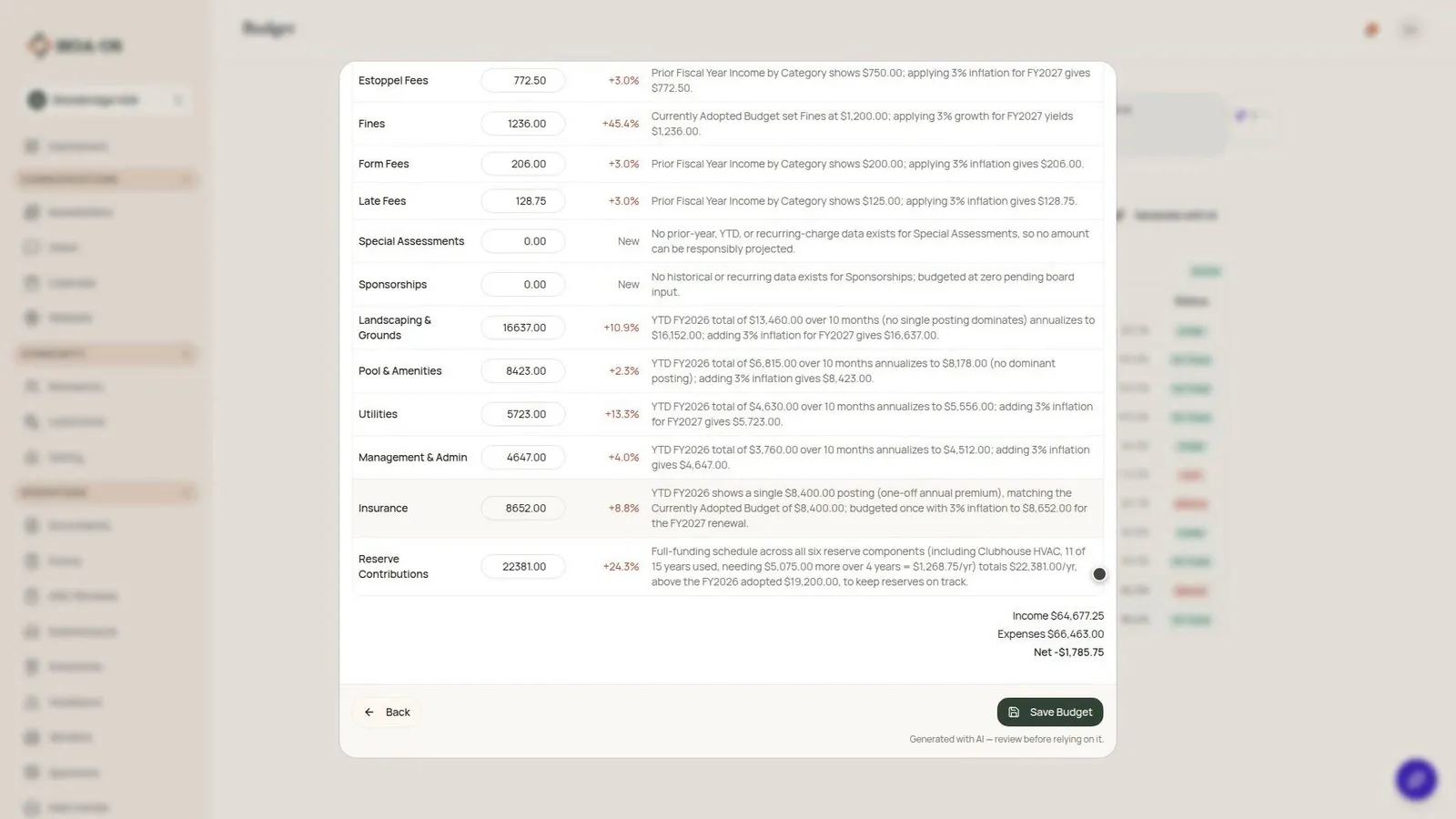
It comes back as a table for 2027, income first. Each line has an amount the board can change, a reason saying where the number came from, and, where there's a last-year figure, how it compares with what actually came in or went out.
HOA-OS works the assessment income out from the billing schedule: 36 lots on the quarterly assessment, $60,480 for the year.
Insurance was one premium of $8,400 this year, and the draft budgets it once for next year.
The reserve contribution goes from $19,200 to $22,381. Its reason names the Clubhouse HVAC the board asked about, $1,268.75 a year toward its replacement. The other reserve components are in the $22,381 as well.
Any amount can be changed before anything's saved. Below the table are the totals for 2027: income, expenses and the difference between them.
Save Budget saves it as a draft budget for 2027. With the Fiscal Year switched to 2027, the page marks it Draft, and spending tracking starts when the year does. Lines that were in this year's budget show how far they've moved from it.
When the board has been through it, Adopt as the 2027 budget, in the Actions menu, is how the draft becomes next year's budget. That step asks for confirmation, and no step turns an adopted budget back into a draft. Nothing is adopted in the video.
HOA-OS writes the draft with AI, and it's a starting point. Ask again and some amounts and reasons will come out differently, which is why every line carries a reason the board can check against its own records.
Filmed in the product on a demo community. The community, its figures and its reserve components were made up for the video.
Questions boards ask about this
Does the board have to build next year's budget from scratch?
No. The board asks for a draft built from the numbers already in its books, then changes any amount it disagrees with before saving.
Where do the draft's numbers come from?
From last year's actual income and spending, this year's budget and what's been posted against it, the recurring charges already set up, the reserve components and what's set aside for each, and any guidance the board types in. Every line carries a reason saying where its number came from.
Can the board tell the draft what to plan for?
Yes. The form has a box for guidance. In the video the board asks it to plan the reserve contribution for the Clubhouse HVAC's replacement, and the reserve line's reason names the HVAC.
Is the saved draft next year's budget?
Not until the board adopts it. Saving creates a draft for 2027, and Adopt as the 2027 budget makes it next year's budget. That step asks for confirmation first.
Why does the reserve line show two different percentages?
They compare against different things. The draft compares each line with last year's actual figure, and the saved 2027 page compares it with this year's budget. In the video the reserve line reads +24.3% in the draft and +16.6% on the saved page.
Will the draft come out the same if the board asks again?
No. Ask again and some amounts and reasons come out differently.
Related reading
- How to Create an HOA Budget (And What Boards Get Wrong)
- The HOA Budget Season Playbook: A Board's Timeline
- How much should our board be putting into reserves each year?
See what HOA-OS covers for self-managed HOA boards at hoa-os.com/self-managed-hoa-software.