
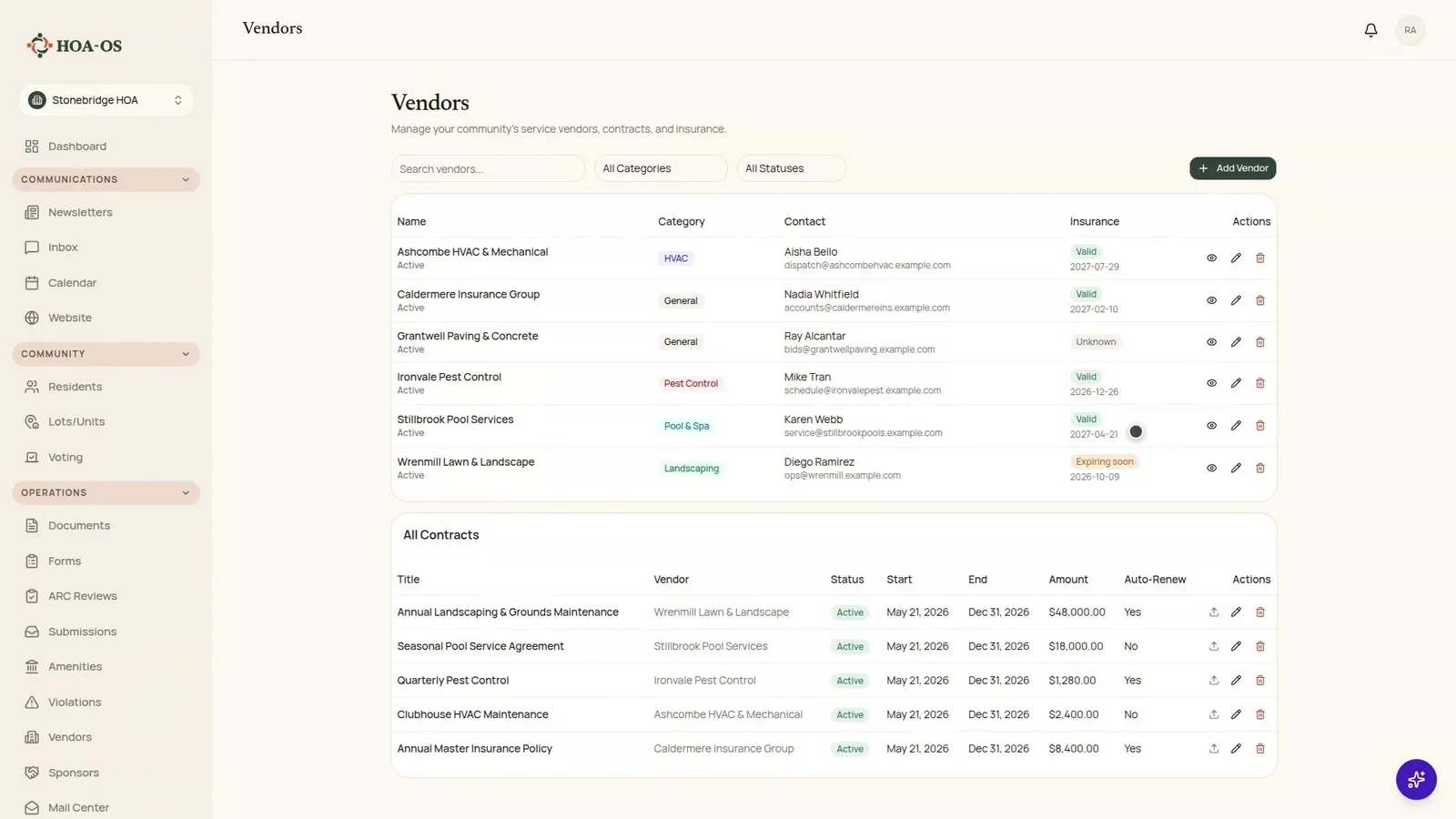

The vendors, contacts and contract amounts in the video are invented demo data, not real businesses or real pricing.
A vendor's certificate of insurance usually arrives as an email attachment. Somebody files it where the board files things, and nobody opens it again. Then a limb comes down on a car, and that's when the board finds out the coverage ran out in March.
This walkthrough shows the other way to hold it: the vendor, the agreement and the date the coverage ends on one page in HOA-OS, where the board can see the date.
What the video covers
- Every vendor on one list, with who they are, what they do and who to call
- The insurance column, and the status shown above each expiry date
- What one vendor's record holds
- Why the status changes on its own as a date gets close
- The agreements, and the auto-renew column
- Narrowing the agreements to one vendor
- Entering an expiry date the record was missing
- What the page does not do
The full walkthrough, in words
The vendor page lists every vendor doing work for the community: who they are, what they do for it, and who to call.
The insurance column, on the right of the vendor list, is the one that's easy to lose. It isn't a note somebody left. It's the expiry date from the certificate, with a status above it. In the demo community most vendors read as current. One has no date on file at all. And one is close enough to running out that the page has already flagged it, which is the row a board wants in front of it rather than having to go looking for it.
Opening a vendor brings up everything the board holds on them: who to call, what they say they're covered by, and what the community has agreed to pay them. The insurance part of the record is four things. Provider, policy number, the date it ends, and status.
The status isn't stored anywhere. The page works it out from the date each time it opens. That's why a vendor that read as current a month ago reads as expiring today, and nobody had to remember to go and change it.
Underneath the vendors are the agreements themselves: what each one is for, when the term started, when it ends, what it's worth, and whether it renews on its own. That last column is the one that costs money quietly. An agreement set to renew on its own will renew whether or not anybody looked at it this year. Picking a vendor narrows the list to that vendor's agreements, so "what have we actually signed with these people" is one click instead of a search through somebody's drive.
Then the video turns to the case most boards start with. One vendor has the carrier and the policy number on the record, but not the date the coverage runs out, so the page says it doesn't know rather than guessing. Most vendor lists look like this on the day a board starts keeping one.
The certificate itself is still a file in somebody's email. The one part of it a board has to be able to act on is the date it stops, so that's the part that goes on the record. Type it into the vendor's record and save, and the row isn't blank any more. It says where that vendor stands, and it changes what it says by itself when the date gets close.
What the page does not do
It doesn't check anything with the insurance carrier. Somebody types the date in, and if they type it wrong, the page shows it wrong. What it does is put the date where the board will see it, so whether a vendor is about to lapse stops being a question somebody has to think to ask.
Questions boards ask about this
Does HOA-OS confirm a vendor's coverage with the insurer?
No. The status comes from the expiry date the board enters. If the date is wrong, the status is wrong. Check the date against the certificate when you type it in.
Do we have to update the status when a certificate gets close to expiring?
No. The status isn't a field anyone sets. The page works it out from the expiry date each time it opens.
What if we don't have the expiry date for a vendor yet?
The record can hold the carrier and policy number without it, and the page shows the status as unknown. Add the date when the certificate turns up.
Where do the contracts go?
On the same page, under the vendors. Each agreement shows what it's for, its start and end dates, its value, and whether it renews on its own.
Related reading
HOA-OS is software for self-managed HOA boards. See what it covers at hoa-os.com/self-managed-hoa-software.