

A board about to change the pool hours or spend reserve money usually hears from the five loudest residents and guesses at the rest.
Here the board sends a survey before the meeting. It picks one from a library of ready-made surveys, sends it to the community's members, and walks into the meeting knowing how many people picked each option.
What the video covers
- The surveys page, where the community's surveys live
- Picking a ready-made survey from the library
- Giving it a title and a closing date before the board meets
- Sending it to all of the community's members
- What a resident sees when they open the link
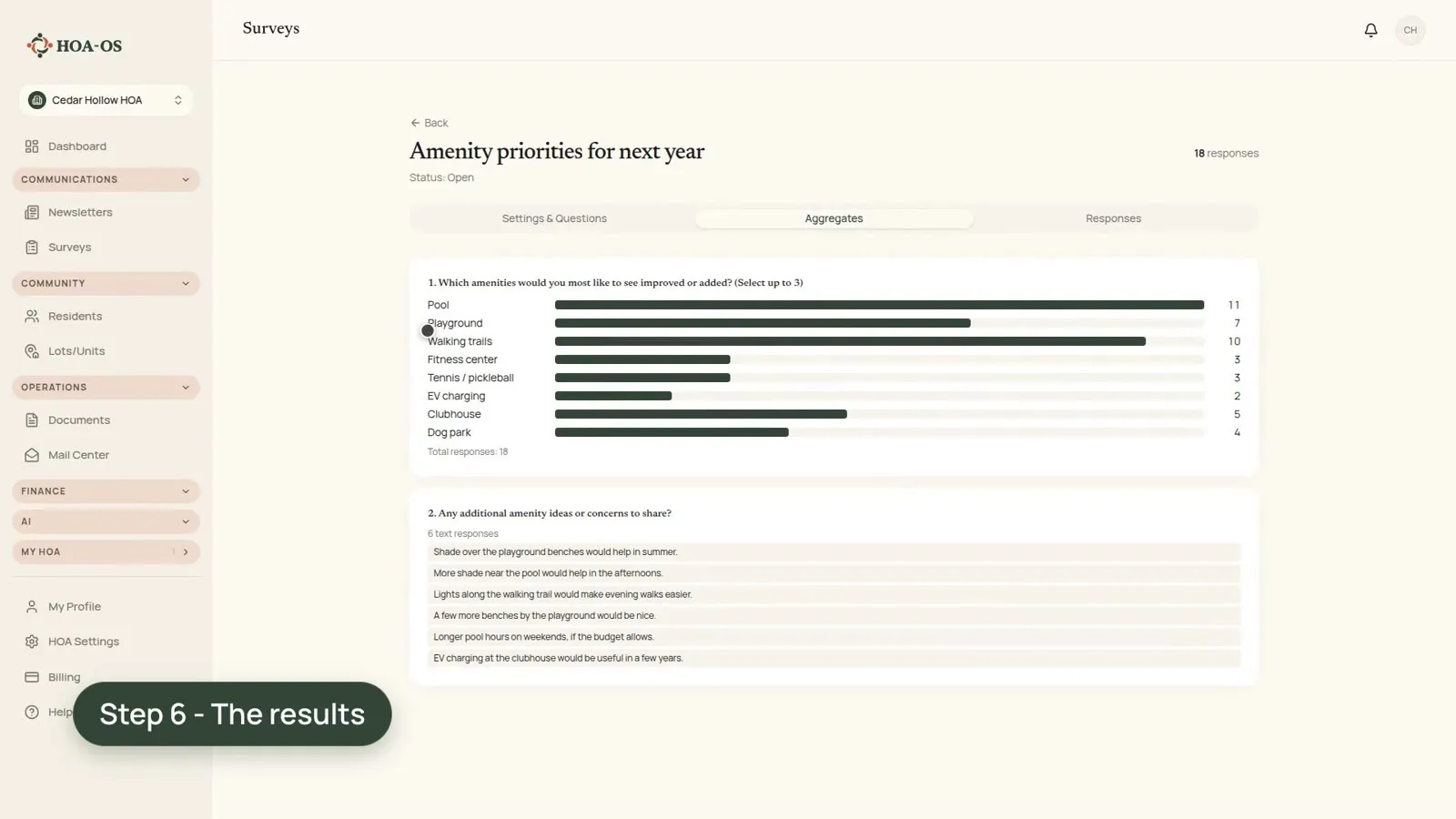
- The answers coming back as counts, with each comment beside its response
- Who a survey hears from, and how to read the counts
The full walkthrough, in words
The board starts a new survey from the surveys page. The questions come ready-made: the board picks the Amenity Priorities survey from the library. It asks which amenities people would most like improved, up to three each, with room for a comment.
The board gives the survey its own title and a closing date that lands before the board meets. It leaves the audience as all of the community's members, then sends it. The invitation is an email with a link, and each member's link is theirs alone.
On the resident's side, the link opens the survey. There's no password to remember. The resident picks up to three amenities, adds a comment if they want one, and sends it back.
Back on the board's side, the answers come in as counts. In the video the pool comes out on top, then walking trails, then the playground, so the board can see how many people picked each one before anyone stands up at the meeting. The comments are there too, each one with the response it came in on.
A survey only hears from the people who answer it. Leave it open long enough, and read the counts as what those residents said.
Filmed in the product on a test community.
Questions boards ask about this
Who gets the survey?
In the video, all of the community's members. The board leaves the audience set to all members, then sends it.
How do residents answer?
Each member gets an email with a link that's theirs alone. The link opens the survey, with no password to remember.
What does the board see when answers come in?
The answers as counts for each option, and the comments, each one sitting with the response it came in on.
What should a board keep in mind when reading the results?
Who answered. The counts come from the residents who sent the survey back, so the closing date matters: set it with enough time before the meeting.
Related reading
- How to run an HOA survey
- The HOA resident engagement playbook
- How to communicate an unpopular HOA decision
See what HOA-OS covers for self-managed HOA boards at hoa-os.com/self-managed-hoa-software.