
When an owner's account keeps sliding after the reminder emails, the board sends a formal letter. On a lot of self-managed boards, a volunteer opens an old Word file, changes the name, and retypes the balance and each charge from the ledger.
Here the board sets the letter up once, as a template. After that, a letter for one lot comes back with that lot's owner, balance and charges filled in from the community's own ledger.
What the video covers
- Where the collection letter templates live, and the starters a board begins with
- Importing a letter the board already has
- Editing a starter, with the Insert field menu
- Adding the Days Overdue field to the opening paragraph
- Putting the board's own phone and email in the contact line
- Generating a letter for one lot and reading it down
- Why a board reads a starter through before using it
The full walkthrough, in words
The letter templates are in the payment settings, under Collection Letters. A board starts with a few starter templates from HOA-OS, ready to edit, and a board that already has a letter of its own can import it there instead.
The board opens the first starter, a delinquency notice. Its text opens in an editor, and the Insert field button lists the parts that change from lot to lot, like the owner's name or the days overdue.
The starter's opening paragraph says the balance is past due but not for how long, so the board adds the Days Overdue field there and each letter shows that lot's own count. Near the end, the starter's contact line points to a general office. The board puts its own phone and email fields there instead, then saves the template.
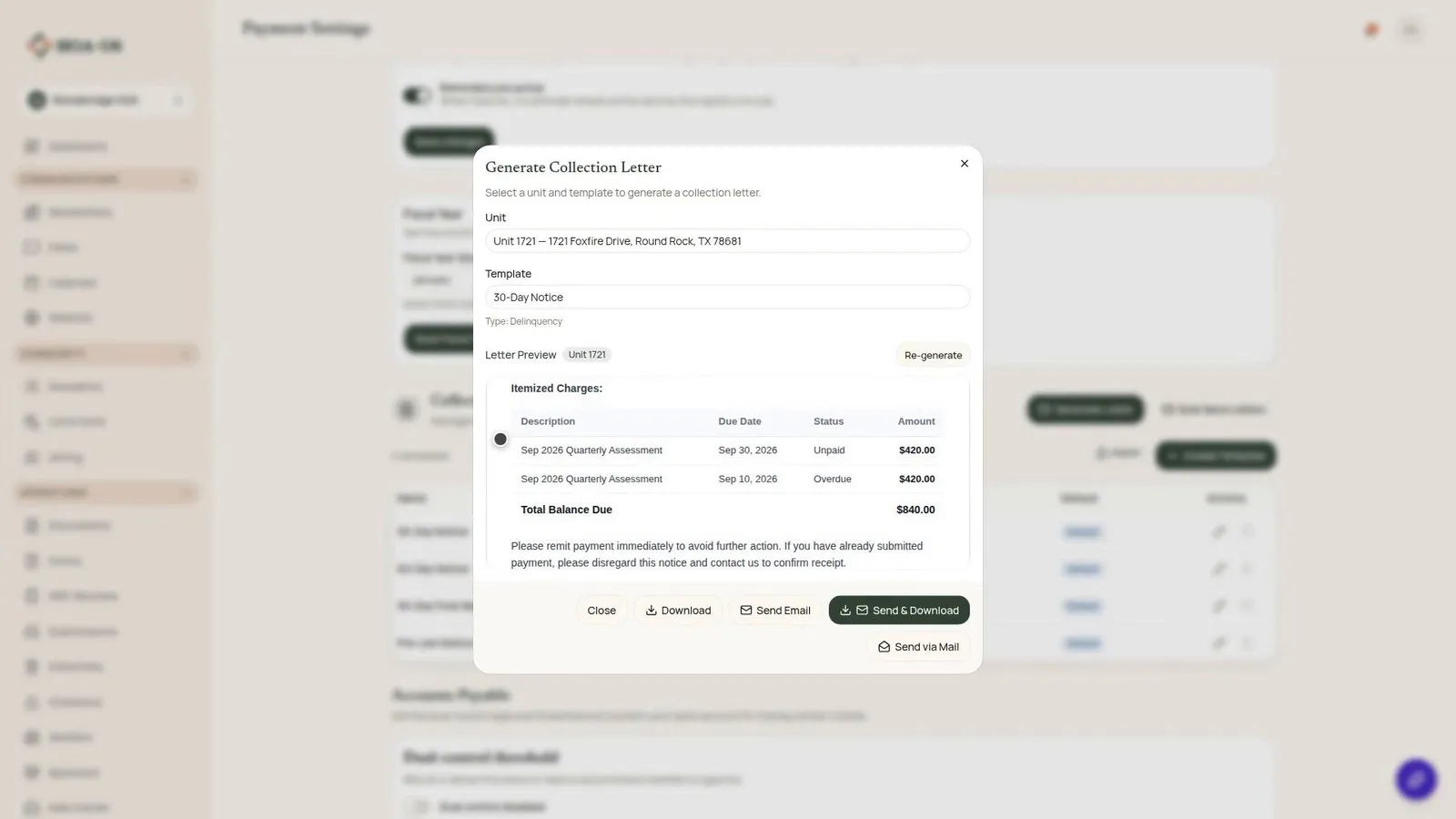
Next comes a letter for one lot. Unit 1721 has quarterly assessments past due. The board opens Generate Collection Letter, picks the unit, picks the notice it just edited, and previews the letter.
The letter is headed with the community's name and today's date, and it's addressed to the owner of record. It gives the balance and the lot's days past due in the sentence the board edited, then a table of the unpaid charges and their total, and near the end the phone and email the board added. Nothing is sent in the video.
The letter says what the template says, word for word, and only the fields change from lot to lot. That's why the board reads a starter through and changes what it needs before using it.
Filmed in the product on a demo community. The owner, the unit, the charges and the board's phone and email were made up for the video.
Questions boards ask about this
Does the board have to write the letter from scratch?
No. HOA-OS includes a few starter templates the board can edit, and a board with a letter of its own can import it.
Where do the balance and charges on the letter come from?
From the community's own ledger for that lot. In the video, the letter lists two quarterly assessments of $420.00 each and a total of $840.00.
Can the letter say how long the account has been past due?
Yes. The Days Overdue field prints that lot's own count. The board adds it to the starter's opening paragraph in the video.
Does the wording change from one owner to the next?
No. Every letter from a template carries the template's sentences word for word, and only the fields change. That's why the board reads a starter through before it uses one.
Related reading
- How to automate HOA late fees and payment reminders
- How does a board keep a record of a delinquent account from the first warning to a filed lien?
- HOA Liens: How They Work and How to Avoid One
See what HOA-OS covers for self-managed HOA boards at hoa-os.com/self-managed-hoa-software.