
Nobody joins a board to chase money. A quarter goes by, four or five lots have not paid, and somebody has to decide whether to charge the late fee this time, to a neighbor, by name, at a meeting where that neighbor might be sitting.
That decision is the part boards get stuck on, and it is the part worth writing down once. This walkthrough shows how a community sets its grace period and its fee, sets the reminder schedule that runs alongside it, and then looks at the result the next morning from both sides: the board's list, and the owner's own page.

Runtime is four minutes.
Chapters
- 0:06 Why the late fee decision gets personal
- 0:35 The late fee rule: grace period and amount
- 1:05 Setting the reminder ladder
- 1:38 The morning after: nine fees, one date
- 2:04 The grace period, and the fee that was not charged
- 2:33 What the owner sees
- 2:58 Where the automation stops
- 3:39 The trade a board is actually making
The rule is two numbers
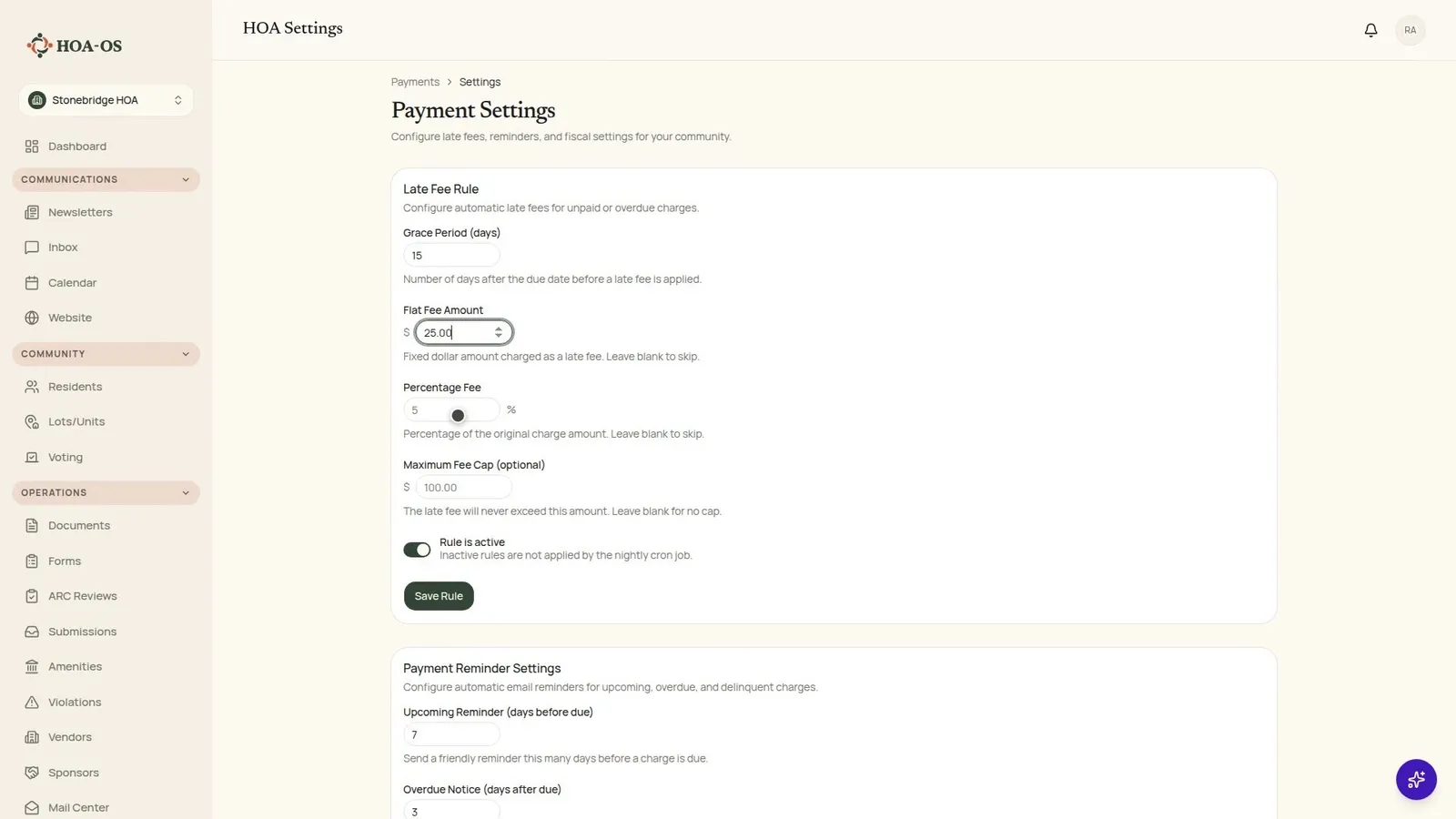
The late fee rule is smaller than most boards expect. How many days after the due date the community waits, and what it charges when that runs out. In the walkthrough the community waits fifteen days and charges twenty-five dollars.
There is a percentage option instead of a flat amount, and a ceiling to go with it, for communities whose governing documents are written that way. The community in the video charges a flat fee, so both of those fields stay empty.
Underneath the amounts is a switch that decides whether any of it happens at all. An inactive rule is not applied by the nightly job. That switch is how a board pauses the policy for a quarter without deleting the numbers it agreed on.
Reminders are the other half of the same job
Reminders are configured on the same page and run on the same nightly schedule. A note before the money is due, a notice once it is late, and then escalating ones for an account that has gone quiet.
In the walkthrough: seven days before the due date, three days after, and then thirty, sixty and ninety. Those go by email to the owner of record.
Once the settings are saved, that ladder runs whether or not anybody on the board remembers it.
What it looks like the next morning
The video picks up after the nightly job has run. Nine late fees, every one created on the same date, sitting in the outstanding list underneath the lots they belong to.
Each fee says what it came from. "Late Fee, Jul 2026 Quarterly Assessment." Twenty-five dollars, unpaid, on lot 1716. A year later nobody has to reconstruct which charge it was for.
The frame worth pausing on is the lot that owes two assessments and carries one late fee. The older charge ran past its fifteen days. The newer one has not, so the rule left it alone, and it will keep leaving it alone until the fifteenth day. The grace period is not a number the job rounds off when it is behind.
The owner is looking at the same event
The owner sees it from the other side, on their own page, and what they see is not a balance that quietly got bigger overnight.
The fee is its own line. It names the assessment it came from, it carries the date it was added, and there is a dispute button next to it. If the board got this wrong, the owner says so there, and a person answers.
Where the automation stops
What none of this does is decide that somebody is a debtor. The notices escalate, the fee is applied, and then it stops on a page that is a list and nothing more.
Putting a lien on a neighbor's home is a board decision with a lawyer in the room. It is a button a person presses, on a day the board chose. Nothing on that screen presses it on a schedule.
A reminder is an email to the address on the roster. It goes out on time, every time, and it cannot make anybody open it. The automation ends at the outbox, and the awkward conversation, when it comes, is still somebody's job.
That is the trade a board is actually making. Write the rule down once, and after that it is the same twenty-five dollars for the neighbor you like and the neighbor you do not, applied by something that was not at the meeting and has never met either of them.
Questions boards ask about this
Does the fee apply the moment a payment is late?
No. It applies on the nightly job, after the grace period has run out. A charge inside its grace period is skipped, and stays skipped until the day the grace period ends.
Can we charge a percentage instead of a flat amount?
Yes. The rule takes a flat amount, a percentage of the original charge, or both, with an optional cap on the total. Communities set it to match what their documents say.
Who receives the reminders?
The owner of record for the lot, by email, at the address on the roster.
Can we turn the policy off without losing our settings?
Yes. The rule has an active switch. While it is off, the nightly job does not apply the rule, and the grace period and amounts stay as the board set them.
Does the software file liens?
No. Filing a lien is a board decision made with counsel. The software keeps the record and the dates; a person takes the action.
What happens if an owner thinks a fee is wrong?
The fee appears as its own line on the owner's payments page with a dispute button beside it. The dispute comes back to the board, and a person answers it.