

A water main breaks, or a storm knocks out the gate, and the board needs people to hear it from the board. The usual options are a phone tree that depends on everyone picking up, a group text from one board member's own phone, or an email that gets opened after it stopped mattering.
In HOA-OS the board writes one message and sends it as a text from the community, to the phone numbers the community already has on file.
What the video covers
- Why a phone tree or a group text falls short in an emergency
- Turning texting on in the community's settings
- The Emergency Broadcast card and who it's addressed to
- Writing a short message
- Checking it in the confirm step and confirming
- How the text reads on a phone, shown as a mockup
- Why the phone numbers on file are worth checking
The full walkthrough, in words
Texting is a community setting, and on this community it's switched off. The board turns it on in the community's settings and saves.
The rest of that panel is for everyday messages: which kinds go out by text, and the quiet hours they keep to. None of it needs touching for an emergency.
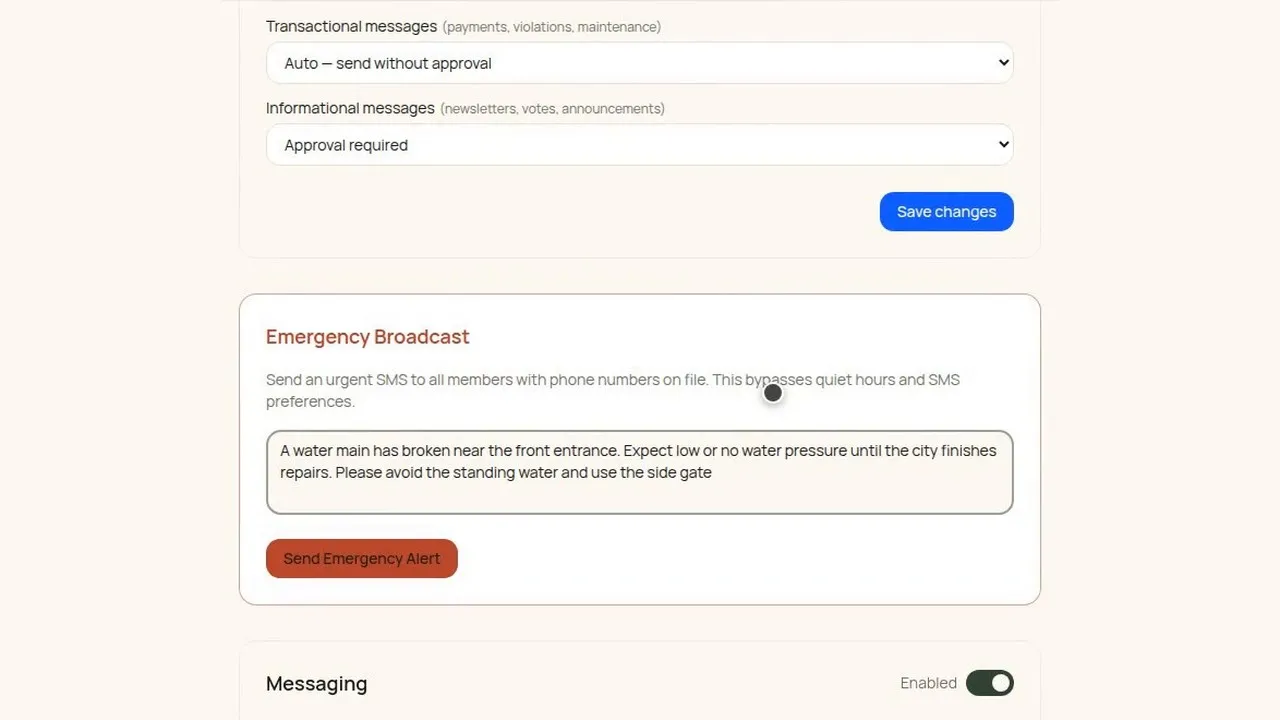
With texting on, the settings page has one more card, in red, headed Emergency Broadcast. There's no list to build. The message is addressed to the members with a phone number on file, and the card says it skips quiet hours and anyone's text preferences. That's the reason to keep it for a real emergency.
The board types the message. A useful one says what happened, what it means for residents, and what to do about it, and it stays short because it's going out as a text. The one in the video is about a water main broken near the front entrance: low or no water pressure until the city finishes repairs, and a request to avoid the standing water and use the side gate.
Before anything goes out, a confirm step asks once more and shows the message back, so the board reads it one last time. After the board confirms, the send starts, and when it's done a notice gives a count of the texts accepted for sending.
Here's how the text reads on a phone, shown as a mockup. It opens with the community's name and the word urgent, then the board's message as it was typed, and a link back to the community's site.
It can only reach the numbers the community has. A resident who never gave one, or changed phones and didn't say, isn't on that send. The phone numbers are worth checking before the day they're needed.
Filmed in the product on a demo community. No texts went out to anyone: the send step was simulated in the browser, so the count on screen comes from that simulation, and the phone is a mockup of the wording the product builds.
Questions boards ask about this
Does the board have to build a list of who gets the text?
No. The emergency message is addressed to the members with a phone number on file.
Does it hold for quiet hours or follow residents' text preferences?
The card says it skips quiet hours and anyone's text preferences. That's the reason to save it for real emergencies.
What does the text say besides the board's message?
It opens with the community's name and the word urgent, and it ends with a link back to the community's site.
Who isn't on the send?
Anyone without a phone number on file, including a resident who changed phones and didn't tell the board. Check the numbers before you need them.
Can the board read the message again before it goes?
Yes. The confirm step shows the message back before anything is sent.
Related reading
- HOA emergency repairs: who decides and who pays
- How to import your resident roster from a spreadsheet
See what HOA-OS covers for self-managed HOA boards at hoa-os.com/self-managed-hoa-software.