
Switching systems is mostly paperwork until you reach the money. Whoever you're leaving hands over one number per unit, and that number is the first thing an owner checks.
The usual choices are typing them in by hand, or emailing the file to somebody else and waiting for them to import it. This walkthrough shows the third option: the board loads its own file, reads every row back before a cent is written, and takes the whole batch out again if the file turns out to be wrong.

What the video covers
- Setting the date the balances are true as of, which is not today
- Loading the file the way the old system sent it, without cleaning it up first
- The total on screen before a single row is written, to check against the old system's receivables
- Every line matched to a property by its address
- Four rows that don't come through clean, and what happens to each one
- Fixing a row the old system filed under its own account number
- Importing the whole thing as one batch
- What a single unit's balance and ledger look like afterwards
- Taking the batch back out, and the one condition that stops you
- What doesn't come over, said plainly
The full walkthrough, in words
Start with a date, and it isn't today. It's the day the board took the community over. Every balance in the file is true as of that day, and that's the day they carry.
Then the file, exactly as it arrived. One line per property, one amount owed, and a column of owner names nobody had to clean up first.
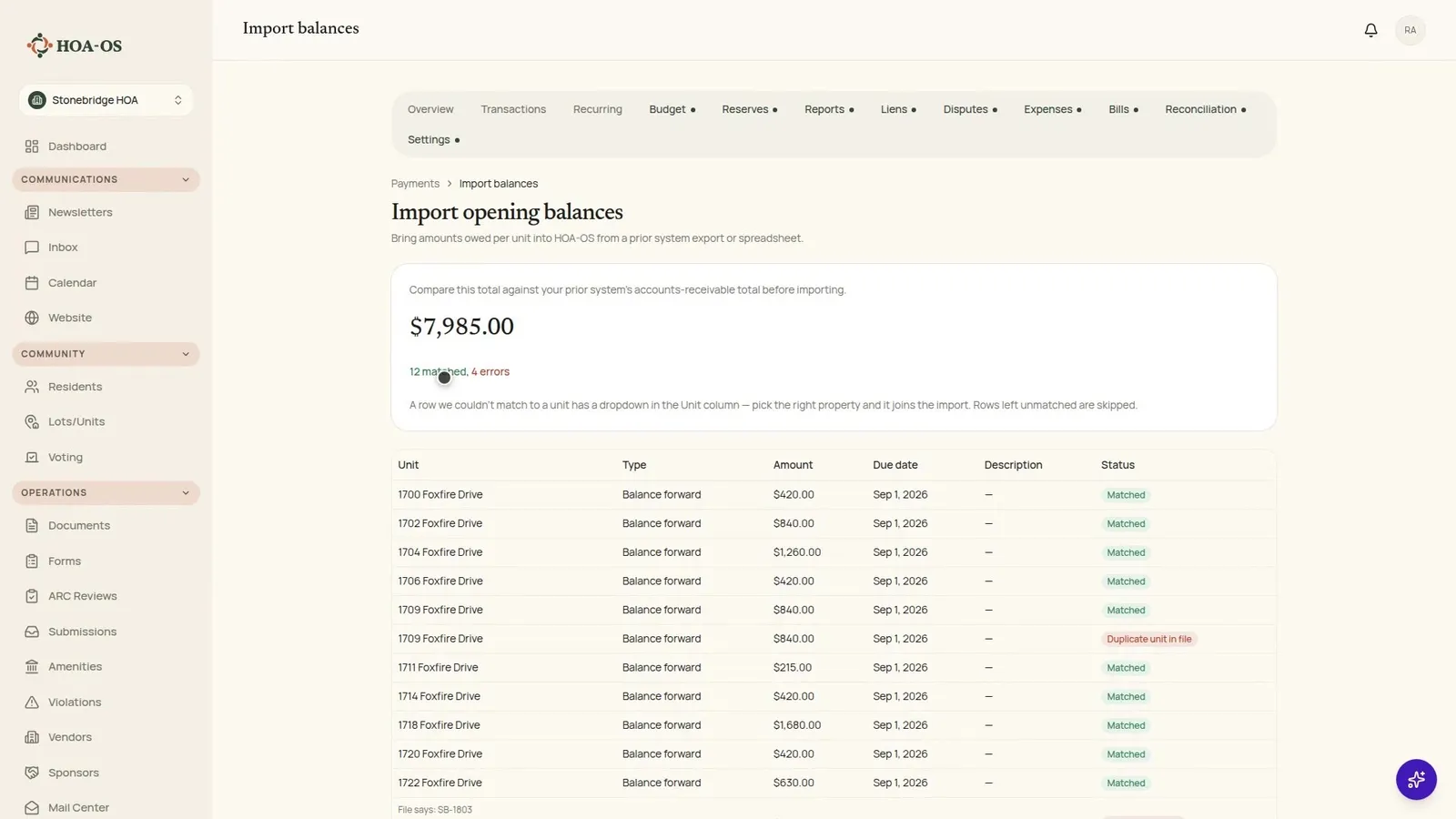
Before a single row is written, the total is on screen. In this walkthrough that's $7,985.00 across twelve properties, and it's the number to hold against the receivables total from the system you're leaving. If those two don't agree, you find out here rather than afterwards.
Underneath it sits every line the file carried, matched to a property by its address, the way the old system wrote it and the way this one already knows it. At the bottom of the same page the import history still says nothing has been imported. Every row is on the screen, and not one of them is in the ledger yet.
It won't reconcile yet, and the rows underneath say why. Four of them didn't come through clean, and they're on screen rather than quietly dropped.
One was filed by the old system under its own account number, so there's no address to match on. A board member knows whose it is, so pointing the row at the property is enough to bring it into the import.
Three don't get fixed here. The same property listed twice. An amount written as text that can't be read as money. And an account that was never a property at all, the clubhouse. None of them lands, and each one is a question back to whoever sent the file.
That leaves $8,825.00 across thirteen properties, with the board knowing exactly which three rows aren't in it. That's a total worth signing off on. The import writes it once, as one batch.
On a single property it reads simply. Unit 1704 owed $1,260 in the old system, and $1,260 is what the balance says here. On the ledger it's one line, described as an opening balance. Not a year of transactions carried over, just the figure that property came in with. From there it's one running account, and everything the community bills joins it.
Back on the import page the whole thing is one row: the name of the file, thirteen rows, the total, and the day it ran.
Which is what makes the last part possible. If the file turns out to be last year's export, that batch comes back out. The screen states the condition rather than leaving you to find it: a batch with a payment already applied against it can't be undone. Where nothing has been applied, the undo takes all thirteen entries back out and puts unit 1704 at zero, on the same page reading what it read before the file ever went in.
One thing to be straight about. What comes over is where each unit stands on the date you set. The charges and payments behind that number stay in the system you're leaving, so get those statements before you go and keep a copy as documents.
Questions boards ask about this
Does this bring over our transaction history?
No. What comes over is where each unit stands on the date you set, as one dated line per property. The charges and payments behind that number stay in the system you're leaving, which is why it's worth pulling those statements before you lose access and keeping them as documents.
What if we import the wrong file?
The batch comes out whole while it's still just a batch, and the undo puts the affected units back where they were. Once a payment, waiver or dispute has been applied against that batch, the product refuses, and it says so on the confirm dialog rather than letting you find out later.
What happens to rows the file gets wrong?
They're shown rather than dropped. A row the old system keyed by account number instead of address can be pointed at the right property and joins the import. A duplicate unit, an amount written as text, and an account that isn't a property at all are left out, and the total on screen reflects what actually goes in.
How do we know the number is right before we commit?
The total appears before anything is written, so you can hold it against the accounts receivable total from the system you're leaving. Every matched line sits underneath it with its unit, amount and due date.
Related reading
HOA-OS is software for self-managed HOA boards. See what it covers at hoa-os.com/self-managed-hoa-software.