
Most boards mean to send a newsletter every month. Then it falls to whoever has a free evening, and the months go by without one.
In HOA-OS the board types a few notes and gets a full draft back to work from.
What the video covers
- Why the newsletter slips when nobody on the board wants to write it
- Picking sections and typing a line or two of notes under each
- Adding the Seasonal Forecast and Gardening Tips sections
- The draft that comes back, laid out on a template
- Reading every line, and taking out a detail the notes never gave
- Moving a section to the top
- The Subscribers tab and who's on the mailing list
- Publish, and the send confirmation
The full walkthrough, in words
This community hasn't put out a newsletter yet, so the board starts one. The first step asks what goes in. The board picks three sections and types a line or two of notes under each: a fall cleanup on Saturday, November 7, the entrance lights being replaced the week of November 9, and yard waste pickup moving to Wednesdays from November 4. Everything the issue should say is in those notes.
There are two more sections, Seasonal Forecast and Gardening Tips. Neither one takes notes. The board clicks each card once, and they're in. Then it asks for the draft.
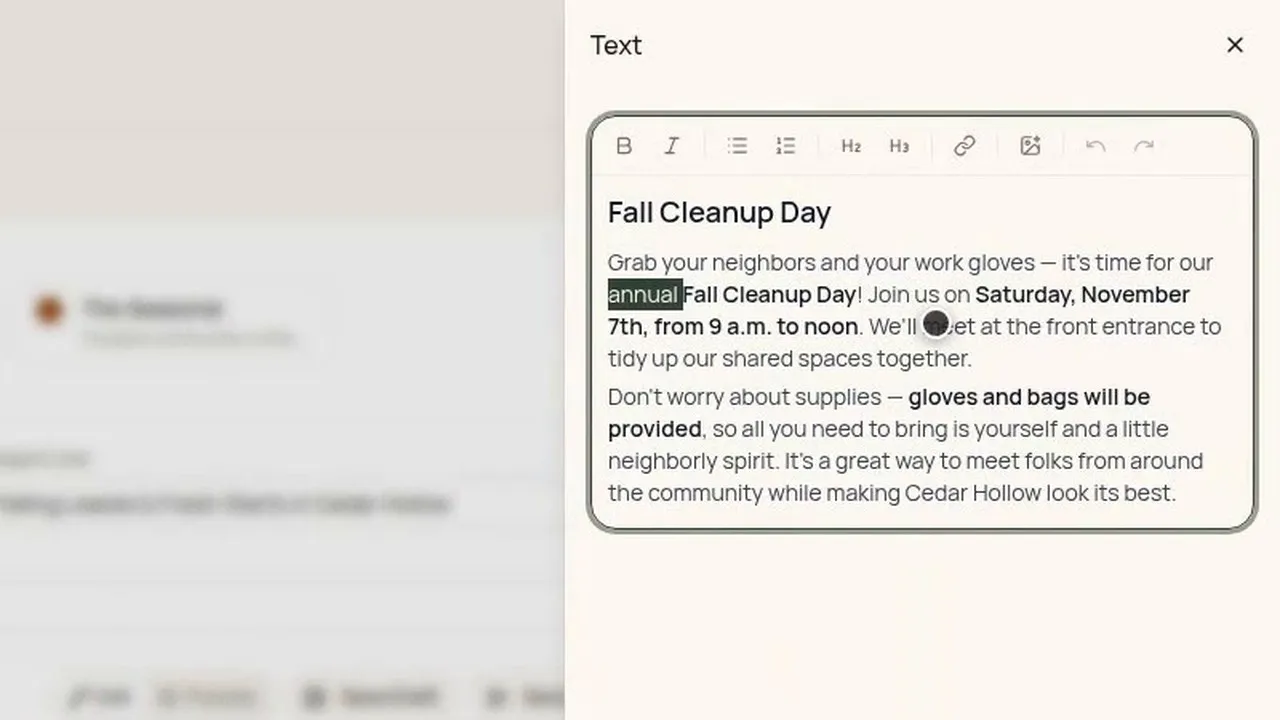
It comes back as a whole newsletter, laid out on a template, with each set of notes written up as its own section. The seasonal forecast comes back filled in. It's written from a short weather forecast for the ZIP code on the community's profile. Gardening tips comes back as a section too.
It's still a draft. Nothing goes to anyone until the board publishes it and sends it.
So the board reads every line. One says the cleanup is annual, and the notes never said that, so the word comes out. Each section is a block the board can drag. The Reminders & Deadlines section matters most this month, so it goes to the top.
The Subscribers tab is the community's mailing list, the people the newsletter goes to. Each address shows whether it's active, and anyone who has unsubscribed is marked and left off the send.
Back in the draft, Publish marks it ready to send. Send asks once more. It says how many people it would go to, the subscribers plus the members who said yes to email, and that each email will carry an unsubscribe link.
The draft is written from the notes, and it can still get a detail wrong. That's why someone on the board reads it before it goes: only the board knows what it meant to say.
Filmed in the product on a demo community. The subscriber names and addresses on screen are made up, and so are the notes the board types. The video stops at the send confirmation.
Questions boards ask about this
Does someone on the board have to write the newsletter from scratch?
No. The board types a line or two of notes under each section it picks, and gets a full draft back to work from. Then it reads and edits that draft.
Do the Seasonal Forecast and Gardening Tips sections need notes?
No. Neither one takes notes. The board clicks each card once, and both come back as sections of the draft.
Where does the seasonal forecast come from?
It's written from a short weather forecast for the ZIP code on the community's profile. Like every other section, it's part of the draft the board reads before anything goes out.
Can the draft get something wrong?
Yes. It's written from the notes, and it can still get a detail wrong. In the video the draft calls the cleanup annual, which the notes never said, and the board takes the word out.
Does anything go out before the board sends it?
No. Nothing goes to anyone until the board publishes it and sends it, and Send asks once more first.
Who's on the send?
The subscribers plus the members who said yes to email. Anyone who has unsubscribed is marked on the Subscribers tab and left off the send.
Related reading
See what HOA-OS covers for self-managed HOA boards at hoa-os.com/self-managed-hoa-software.