
Most communities keep their money in a spreadsheet on one person's laptop. It balances, because the person who built it knows where everything is. The problem shows up the day that person steps down and nobody else can reconstruct how it worked. The walkthrough below takes a different route: record what the community spends as it spends it, and let every statement be built out of those records rather than written up separately at the end of the year.

The community in the video has thirty-six homes paying four hundred and twenty dollars a quarter. Everything that money has gone out on this year sits in one list, and six different statements come out of that same list.
One list of what the community spends
Every row carries what the expense was for, who it was paid to, the date, and how it was paid. There is no second copy of it anywhere. That is worth saying plainly, because the usual arrangement is a checkbook, a spreadsheet, and a folder of invoices that all have to agree with each other. Here the rows are the record, and every statement in the video is built out of them.
The category on each row is what groups it on the statements. Categories arrive already set up, so nothing has to be designed before the first entry goes in.
Name the categories the way your community talks
The community in the walkthrough rents its clubhouse out, and the board would rather the statement said so. Renaming the category once changes how it reads everywhere it appears: on the ledger, in the budget, and on every statement it lands on.
This matters more than it sounds like it should. A statement that uses the words the board uses in its meetings is a statement residents can read without a translator.
A real expense goes in once
A storm takes a limb off one of the oaks along the entry, and the landscaper sends an invoice. The entry takes the date, what it was for, the amount, the category it belongs to, the vendor, and the check it was paid with. There is a place on the entry for the invoice file itself, so the paper and the number stay together instead of living in separate places.
Two hundred and thirty-five dollars against landscaping and grounds. Added, it sits in the same list as everything else. One entry, typed once, and every statement that touches it updates because it is reading the same row.
Income and expense, for whatever dates you ask for
The first statement is income and expense for any date range you choose. The income side is grouped by where the money came from: assessments, fines, and the clubhouse rentals that were just renamed.
Underneath the expenses, the landscaping line already carries the entry from a minute ago. At the bottom is what came in against what went out for exactly those dates. That figure is arithmetic on the rows above it, not a number somebody typed in.
The budget, measured against where you should be by now
Change the report and the same records come back as the budget: what each line was given for the year, and what it has used so far.
The budget screen goes a step further. Instead of measuring a line against the whole twelve months, it measures it against where that line should be by this point in the year. That is the difference between finding a problem in December and finding it in July. In the walkthrough, landscaping is running past its pace, the storm work is part of why, and the board is looking at it while there is still time to do something.
The reserve fund, the statement every sale asks for
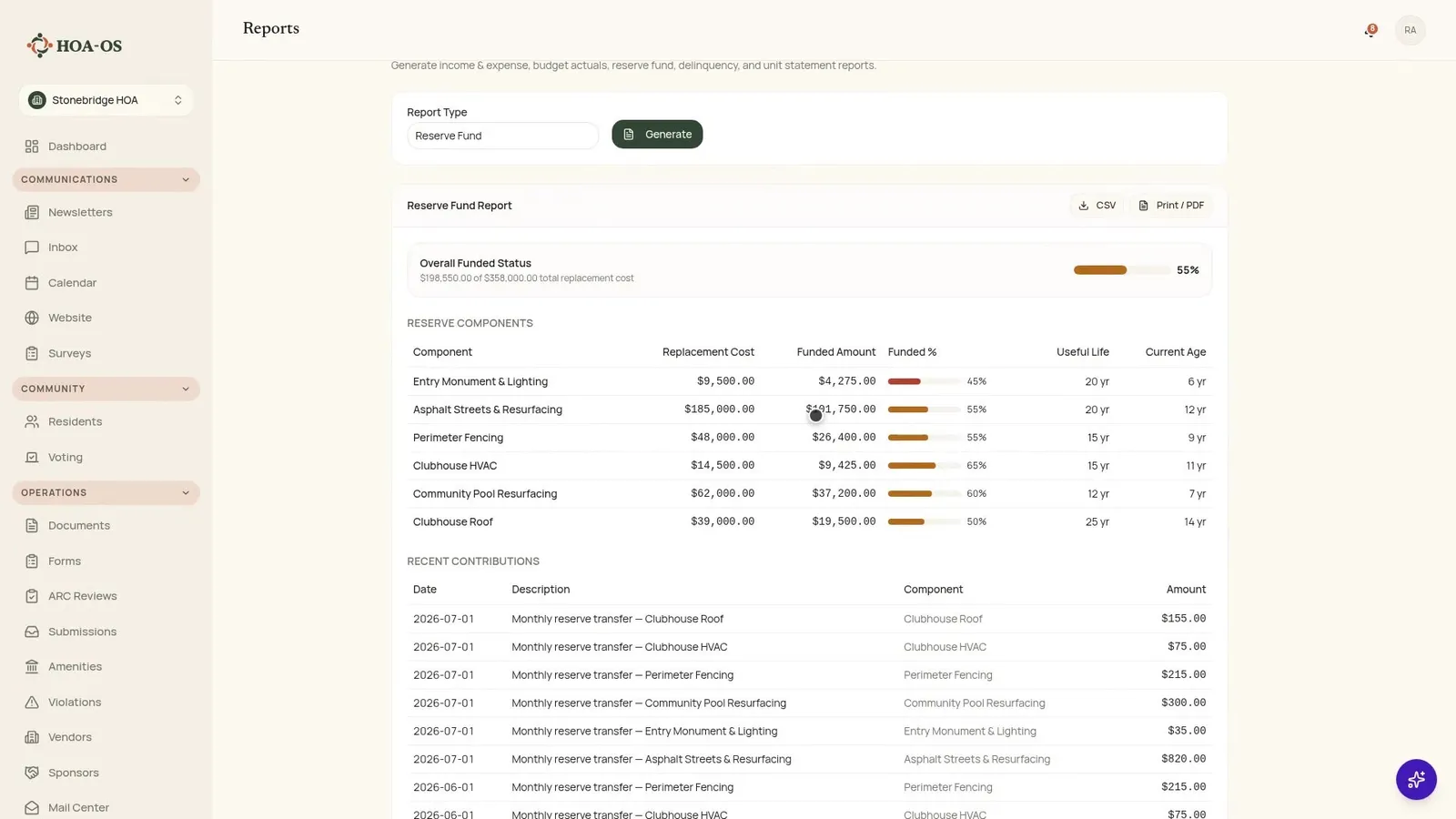
The reserve fund report is what boards get asked for in every closing: what the community owns that will eventually need replacing, what each of those things costs, and how much is set aside against it so far.
Streets, the pool, the fencing, the clubhouse roof and its air conditioning, three hundred and fifty-eight thousand dollars of replacement cost between them, each with its own age and its own funded share. Sixteen hundred dollars a month goes in, split across all six components.
Correcting a wrong number without hiding it
Then the part that matters more than any of the reports. The invoice was three hundred and twenty-five dollars. What went in was two hundred and thirty-five. Two digits, the wrong way round, which is the single most common thing that happens to a set of books.
The correction does not overwrite anything. It writes a reversal of the original entry at the negative amount, and a corrected entry beside it. All three rows stay on the record, and the ledger tells you which is which. Generate the statement again and it has followed: the category total is right, and how it got right is still visible.
An auditor asks for exactly that. So does the next board, two years from now, when somebody wants to know why a number changed.
The package your accountant asks for
The last of the six is the year-end file. Set the year and it comes out as a folder: every transaction, income by category, totals per vendor for their 1099s, what residents still owe, and the budget against actuals.
Each one is a plain spreadsheet. Not a proprietary export, not a report that has to be re-keyed. It is the same set of records everything else came out of, in the format an accountant already works in.
Two more statements round out the set: a delinquency report, and a statement for a single home when an owner asks for one.
A note on cash basis
These books are kept on a cash basis. Income counts on the day the payment arrives, not the day the charge went out. Worth knowing before a board compares a total here against a number from a system that counted it differently.
Frequently asked questions
Do I have to enter transactions twice, once for the ledger and once for the statements? No. There is one list of records. Every statement in the video is generated out of those same rows, so a single entry updates all of them.
Can I rename the income and expense categories? Yes. Categories arrive already set up and are yours to re-word. Renaming one changes how it reads on the ledger, in the budget, and on every statement it appears on.
What statements can the board generate? Six: income and expense, budget against actuals, the reserve fund, delinquency, a statement for a single home, and a year-end package for your accountant.
What happens if I enter the wrong amount? The correction writes a reversal of the original entry and a corrected entry beside it. All three rows stay on the record, the ledger marks which is which, and the statements pick up the corrected total.
Can I attach the invoice to the expense? Yes. The expense entry has a place for the invoice file, so the document and the amount stay together.
How does budget against actuals differ from a plain budget report? It measures each line against where it should be at this point in the year rather than against the full twelve months, so an overrun surfaces mid-year instead of at year end.
What is in the accountant package? Every transaction, income by category, totals per vendor for 1099s, outstanding resident balances, and budget against actuals, each as a plain spreadsheet.
Are the books cash basis or accrual? Cash basis. Income counts on the day the payment arrives.
The books stop being one person's spreadsheet
That is the whole loop. Record what the community spends when it spends it, name the lines the way your community talks, and the statements are there when somebody asks for them.
If you want the background on what each statement is telling you, HOA financial statements: how to read them covers that, and HOA bookkeeping for self-managed boards covers the habits behind it. If you would rather see the software itself, take a look at HOA-OS or get in touch.